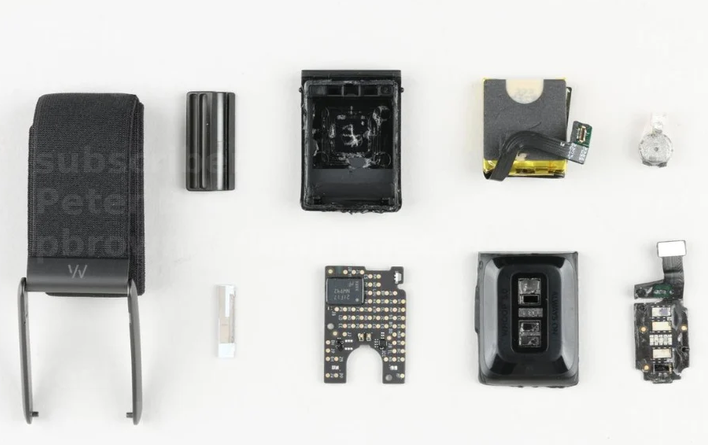
The WHOOP 5.0, taken apart. A small, elegant computer for the wrist. Teardown photo by TechInsights, via Electronics360. Used here for illustration and commentary; all rights remain with the original copyright holder. I do not own this image.
A note before we begin. Everything below was done on a WHOOP 5.0 strap that I own, after my subscription lapsed, purely to understand the device I paid for. This is a learning story, not an attack. No servers were touched, no accounts, no DRM, no other people’s data. I’m not redistributing the apps I built, and I’m not encouraging anyone to misuse WHOOP’s service. If you take one thing from this post, let it be the engineering, not a how-to for piracy. The full “rules I held myself to” are in Section 2.
CLIENT_HELLOThere’s a peculiar feeling that comes from owning a device you don’t fully understand.
I had a WHOOP 5.0, the little screenless band that lives on your wrist and quietly measures your heart, your sleep, your strain. For months it whispered numbers to an app and a cloud I couldn’t see into. Then my subscription ended, and the whispering stopped. The strap still glowed. The sensors still spun. The battery still drained. But the data, my data, pulled from my pulse, went dark.
That’s when the itch started. Not “how do I get free WHOOP.” The strap is a beautiful piece of hardware: an Ambiq Apollo-class Cortex-M4 sipping microamps, a green-and-IR optical heart sensor, an accelerometer, a skin-temperature chip. It was sitting on my wrist doing real signal processing. And I realized I had no idea how.
So I asked a simple, stubborn question:
When this strap talks over Bluetooth, what is it actually saying?
This is the story of finding out. Of teaching the strap to talk to me instead of a subscription. I named the project ZHOOP, a fond, slightly absurd nod to the thing it studies, and over a few weeks it went from a single nRF Connect scan to two working dashboards (a web app and a native Android app) showing my recovery, strain, sleep stages, and a 24 Hz optical waveform pulled straight off the silicon.
Let’s begin where every hardware mystery begins: at the door.
The WHOOP 5.0, taken apart. A small, elegant computer for the wrist. Teardown photo by TechInsights, via Electronics360. Used here for illustration and commentary; all rights remain with the original copyright holder. I do not own this image.
Before a single byte, the rules. I wrote these down at the start and kept to them, because the line between curiosity and abuse is exactly the line between a fun engineering project and a problem.
What this project is:
What this project is not, and never will be:
And one more, the most important:
The numbers I compute are honest approximations, not WHOOP’s scores. WHOOP’s Recovery, Strain, and Sleep are proprietary, cloud-trained models. Mine are textbook formulas (RMSSD, Edwards TRIMP, z-scores) run locally. I label them as such, everywhere, and I gate them so they refuse to show a number until there’s enough data to mean anything. Honesty is a feature, and we’ll return to it in Section 12.
With the charter set, let’s listen.
Bluetooth Low Energy devices are surprisingly chatty. They advertise what they are before you even connect, and they organize what they can do into a tidy little tree called GATT (the Generic Attribute Profile): services (folders) containing characteristics (values you can read, write, or subscribe to).
My very first tool wasn’t code at all. It was nRF Connect, the free Nordic Semiconductor app, running on an iPhone. Before writing a single line of Python, nRF Connect let me do all the early reconnaissance by hand:
RUSHEEL'S WHOOP), with its signal strength and advertising data right there on screen.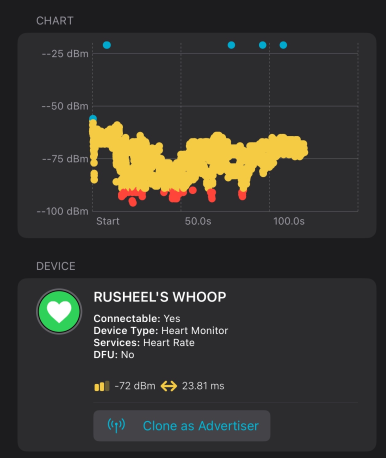
nRF Connect scanner view. First contact: the strap advertising itself, before any code.
0x180A) gave me the device’s identity with zero effort:Model: 5.0
Firmware: 50.37.1.0
Hardware: WG50_r52 (WG50 = WHOOP 5.0)
Serial: 5AG0•••••• (masked)
Mfr: WHOOP Inc.
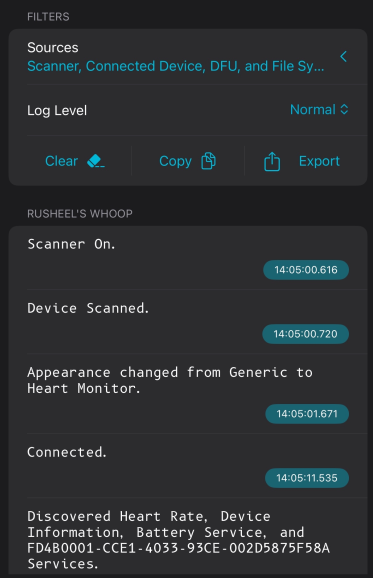
nRF Connect’s own timestamped log narrating the connect: scan, connect, then service discovery surfaces the custom FD4B0001 service.
First, the standard, polite characteristics that anyone can read with no permission at all:
| Service | UUID | What it gives you |
|---|---|---|
| Heart Rate | 0x180D / 0x2A37 |
Live BPM, right now |
| Battery | 0x180F / 0x2A19 |
Strap charge % |
That’s not a leak, that’s the Bluetooth SIG standard. Any heart-rate monitor exposes 0x2A37. Right inside nRF Connect, I tapped “Notify” on the Heart Rate characteristic and watched my own pulse tick across the phone screen: 72, 73, 74. First contact, before I’d written any code at all. The strap was talking; I just had to know which characteristic to listen on.
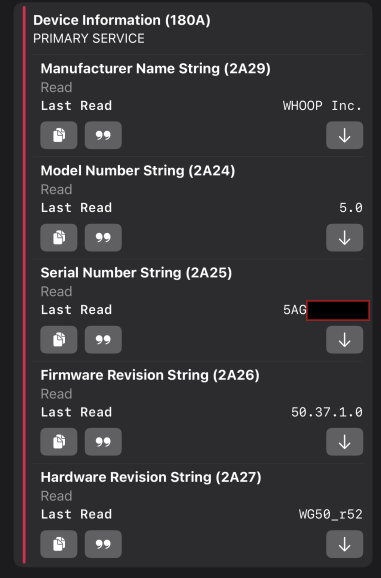
The Device Information service, read with no pairing. Model 5.0, firmware 50.37.1.0, hardware WG50_r52.
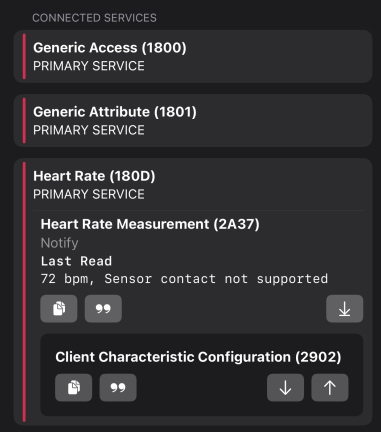
The standard Heart Rate characteristic (2A37), bond-free, reading 72 bpm live.
Second, a custom service that is clearly where the real action lives:
Service  FD4B0001-CCE1-4033-93CE-002D5875F58A   (the WHOOP service)
  FD4B0002   Write / WriteNoResponse   <- the command channel
  FD4B0003   Notify                    |
  FD4B0004   Notify                    | sensor & metadata streams
  FD4B0005   Notify                    |
  FD4B0007   Notify                    |
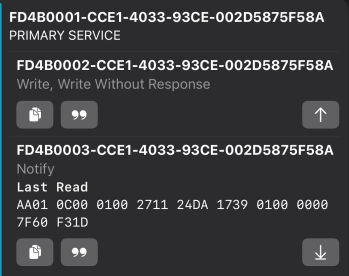
The custom WHOOP service FD4B0001. Note FD4B0002 is “Write, Write Without Response” (the command channel), and the first raw AA01... frame.
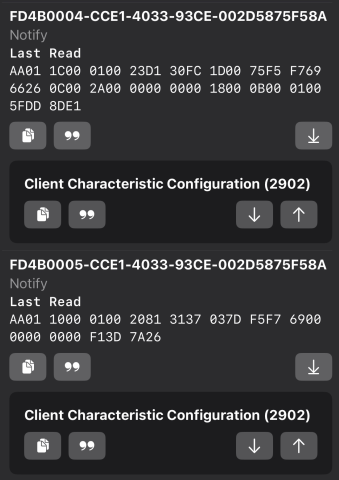
The notify characteristics streaming raw AA01... frames. This hex is exactly what the frame parser in Section 5 decodes.
Still in nRF Connect, I subscribed to those notify characteristics by hand and watched a trickle of bytes arrive, framed with a repeating AA 01 ... header. FD4B0007 in particular spat out streams of repeating 16-bit values, my first glimpse of what turned out to be the raw 24 Hz optical photoplethysmography (PPG) waveform: the literal light bouncing off the blood in my wrist. Seeing real frames land in a phone app, before writing a line of code, is what convinced me this was worth chasing.
So what did nRF Connect get me, exactly? The entire map and the proof of life. Device identity, the full GATT tree, the discovery of the custom FD4B service, confirmation that HR and battery were bond-free, and the first sight of raw frames. What it couldn’t do was the heavy lifting: assembling checksummed command frames, performing the handshake, and driving the multi-step history offload. For that I moved to scripting with Python’s bleak on a Windows PC. nRF Connect was the scout that drew the map; bleak (and later Kotlin) was the expedition that walked it.
Because the trickle of frames was just idle chatter, heartbeat events and the occasional fault log. The strap wasn’t going to hand over its history until I asked. And to ask, I needed to write to that command channel (FD4B0002). Which meant I needed to get through the door properly.
CLIENT_HELLOHere’s the first real wall, and it’s a sensible one: the strap holds exactly one encrypted BLE bond at a time. While it’s bonded to the official WHOOP app, the command channel is off-limits to anyone else. Live HR and battery work bond-free (those are standard, low-stakes characteristics), but writing commands requires being the bonded device.
This is a hardware reality, not a hack to defeat. To bond ZHOOP to my own strap, I did exactly what you’d do to pair it to a new phone:
bleak’s client.pair() from my script.The bond went through. All FD4B notify characteristics now subscribed cleanly. And the strap still only emitted idle events. Because subscribing isn’t enough: the data stream must be commanded on.
The trigger is a single, fixed, magic packet that the 5.0 firmware (codenamed “puffin” in the community references) expects immediately after connecting. It’s a GET_HELLO-style frame, and it’s static, the same 16 bytes every time:
CLIENT_HELLO = bytes.fromhex("AA0108000001E67123019101363E5C8D")
# Written to FD4B0002 right after connect, wakes the command channel.
Write that to the command characteristic, and the strap comes alive. It replies with a COMMAND_RESPONSE (a 124-byte frame containing its name and firmware version), and the command channel is now hot. From here, the strap will answer questions.
But to ask questions, I had to learn its grammar.
Every byte the strap sends or expects is wrapped in a frame with a precise, layered structure. Decoding it was the single most satisfying part of the whole project, the moment a wall of hex turned into sentences.
A WHOOP 5.0 frame looks like this:
+----+----+----------+---------+-----------+--------------------------+-----------+
| AA | 01 | declLen  | header  | crc16     | inner: type, seq, cmd,   | crc32     |
|    |    | (u16 LE) | (2 B)   | (modbus)  | payload (padded to 4)    | (zlib LE) |
+----+----+----------+---------+-----------+--------------------------+-----------+
   start-of-frame   length     CRC over    the actual message          CRC over
   marker (0xAA)               header[0:6]                              the inner
0xAA is the start-of-frame marker, how you find frame boundaries in a stream that can split or coalesce packets.declLen is the declared inner length; total frame size is declLen + 8.0xA001, init 0xFFFF) over the header,Here is the real builder for a 5.0 command frame, straight from the ZHOOP source (Kotlin, from the Android app’s WhoopProto.kt). Notice the three checksum layers being assembled:
fun buildPuffinCommand(
    cmd: Int, seq: Int = 0, payload: ByteArray = byteArrayOf(0),
    type: Int = 35, header: ByteArray = byteArrayOf(0x00, 0x01),
): ByteArray {
    // inner message: type, sequence, command, then payload, padded to a 4-byte boundary
    val inner0 = byteArrayOf(type.toByte(), seq.toByte(), cmd.toByte()) + payload
    val pad = (4 - inner0.size % 4) % 4
    val inner = inner0 + ByteArray(pad)
    val declLen = inner.size + 4

    // header: 0xAA, 0x01, length (u16 LE), 2 header bytes
    val head = byteArrayOf(
        0xAA.toByte(), 0x01,
        (declLen and 0xFF).toByte(), ((declLen shr 8) and 0xFF).toByte(),
        header[0], header[1],
    )
    val c16 = crc16Modbus(head)   // CRC-16/Modbus over the 6 header bytes
    val c32 = crc32(inner)        // CRC-32 (zlib) over the inner message

    return head +
        byteArrayOf((c16 and 0xFF).toByte(), ((c16 shr 8) and 0xFF).toByte()) +
        inner +
        byteArrayOf(
            (c32 and 0xFF).toByte(), ((c32 shr 8) and 0xFF).toByte(),
            ((c32 shr 16) and 0xFF).toByte(), ((c32 shr 24) and 0xFF).toByte(),
        )
}
And the CRC-16/Modbus, bit-twiddled the way the firmware does it:
fun crc16Modbus(data: ByteArray): Int {
    var crc = 0xFFFF
    for (b in data) {
        crc = crc xor (b.toInt() and 0xFF)
        repeat(8) {
            crc = if (crc and 1 != 0) (crc ushr 1) xor 0xA001 else crc ushr 1
        }
    }
    return crc and 0xFFFF
}
How do you know you’ve got the grammar right? You write a self-test that rebuilds a packet you captured from the strap and checks it’s byte-for-byte identical. ZHOOP’s CLIENT_HELLO, its acknowledgement frames, and its decoded records were all validated against real captured frames and against the community reference vectors (the open noop project’s test data). When verify_hist.py passed all 13 checks, including a byte-exact match on a reassembled PPG waveform and an acknowledgement frame (aa0110...a4fb), I knew the grammar was real, not a lucky guess.
A note on the 4.0 strap. I also have an older WHOOP 4.0, and built support for it. The two generations rhyme but differ: 4.0 uses a different service UUID (
61080001...), a CRC-8 on its length bytes instead of CRC-16, its inner record starts at byte 4 (vs byte 8 on 5.0), and its session opens with a bond-write rather than a static hello. ZHOOP auto-detects the family from the GATT services on connect. Same idea, different dialect.
Now, what can we actually say?
The command channel speaks in opcodes. Here are the ones ZHOOP uses, all read-only or benign:
val COMMAND = mapOf(
    "TOGGLE_REALTIME_HR"      to 3,    // start/stop the 1 Hz live HR stream
    "SET_CLOCK"              to 10,    // sync the strap's clock
    "GET_CLOCK"              to 11,
    "SEND_HISTORICAL_DATA"   to 22,    // the big one: offload the ~14-day store
    "HISTORICAL_DATA_RESULT" to 23,    // acknowledge a chunk (advances the cursor)
    "GET_BATTERY_LEVEL"      to 26,
    "GET_HELLO_HARVARD"      to 35,    // the handshake reply
    "RUN_HAPTICS_PATTERN"    to 79,    // buzz (4.0)
)
Two ways to get data out:
Live heart rate. TOGGLE_REALTIME_HR with payload [01] makes the strap stream REALTIME_DATA (packet type 40) at ~1 Hz, with the BPM sitting at byte 16. I watched it climb 80 to 97 as I jogged in place. This is the only truly live signal, and crucially, it’s the same limitation the real WHOOP app has. HRV, recovery, sleep, temperature, and the PPG waveform are not streamed live; they come out of the historical store. One BLE link can’t do live-HR and history-offload at the same time.
The history offload. SEND_HISTORICAL_DATA (opcode 22) opens the floodgates to the strap’s rolling ~14-day on-device store. This is where the gold is, and it’s a whole state machine (Section 7).
The firmware also exposes commands that can damage or wipe the device. ZHOOP has a hard rule, encoded as a comment and as deliberate omission, to never send them:
// NEVER SEND, destructive:
//   25  FORCE_TRIM        (wipes the on-device store)
//   29  REBOOT
//   32  POWER_CYCLE
//   36/37/38  firmware load
//   45  BLE_DFU           (firmware update mode)
//   99  fuel-gauge reset
Reverse engineering responsibly means knowing where the cliffs are and staying away from them. These opcodes exist; I documented them so I’d recognize them; I never call them.
One write I did make, happily: a haptic buzz. On the 5.0 this is opcode 0x13 with a small effect payload, and the first time I sent it, the strap vibrated on my wrist. The first command in the whole project to produce a physical action in the real world. It’s a tiny thing, but after days of staring at hex, feeling the device respond to a packet I’d hand-assembled was genuinely magical.
fun buildHaptics(seq: Int = 0): ByteArray {
    // 5.0 haptic: opcode 0x13 + effect bytes (47, 152), a gentle "alarm" buzz
    val payload = byteArrayOf(0x01, 47, 152.toByte(), 0, 0, 0, 0, 0, 0, 0, 0, 0)
    return buildPuffinCommand(0x13, seq, payload)
}
The history offload isn’t a download. It’s a conversation, and if you don’t hold up your end, the strap repeats itself forever.
Here’s the dance:
ZHOOP                                    STRAP
  |                                        |
  |-- CLIENT_HELLO ----------------------->|  (wake command channel)
  |-- SET_CLOCK / GET_CLOCK -------------->|
  |-- SEND_HISTORICAL_DATA (22) ---------->|
  |                                        |
  |<----- METADATA: HISTORY_START (49) ----|
  |<----- type-47 record ------------------|  } biometrics +
  |<----- type-47 record ------------------|  } PPG waveform
  |<----- type-47 record ------------------|
  |<----- METADATA: HISTORY_END (49) ------|
  |                                        |
  |-- HISTORICAL_DATA_RESULT (23) -------->|  <- ACK! advances the cursor
  |      payload = [01] + end_data         |
  |                                        |
  |<----- (next chunk) --------------------|
  |           ...                          |
  |<----- METADATA: HISTORY_COMPLETE (49) -|  done (caught up)
The critical insight: every HISTORY_END must be acknowledged with a HISTORICAL_DATA_RESULT carrying the chunk’s end_data cursor. The acknowledgement is what tells the strap “I’ve safely got this, you can advance.” Skip it, and the strap re-serves the same chunk in an infinite loop. (The metadata offsets on 5.0 sit 4 bytes later than on 4.0: meta_type@10, unix@11, the cursor at frame[21:29].)
ZHOOP’s sync engine does exactly this, and it flushes decoded records to its database before acking, so the durable cursor never advances past data that wasn’t actually saved:
WhoopProto.MetaKind.END -> m.endData?.let { ed ->
    // Flush to DB BEFORE acking, so the strap's cursor only advances past saved data.
    flush()
    ble.write(WhoopProto.buildHistoryAck(ed, nextSeq()))
}
On a real run, this pulled 5,036 records in 22 seconds into a pair of CSVs. A delightful surprise: during the offload, the firmware also emits plaintext console logs (packet type 50), internal debug chatter like SIGPROC-WEAR-DETECT V5 and a SLEEPFLAG state machine. The strap was narrating its own signal processing to anyone who cared to read. I cared.
The history store is a river of type-47 records, and they come in versions. The version byte (at offset 9) tells you what you’re looking at:
This is where bytes become physiology. Here’s the real decoder:
fun decodeBioV18(frame: ByteArray): BioRecord? {
    if (frame.size < 75 || frame[9].toInt() and 0xFF != 18) return null

    val unix = u32le(frame, 15)                              // timestamp
    val hr   = frame[22].toInt() and 0xFF                    // heart rate (bpm)
    val rrCount = frame[23].toInt() and 0xFF                 // # of R-R intervals

    // R-R intervals: u16 LE, starting at byte 24, two bytes each
    val rrs = ArrayList<Int>()
    for (i in 0 until rrCount) {
        val o = 24 + 2 * i
        if (o + 2 <= frame.size) rrs.add(u16le(frame, o))    // milliseconds between beats
    }

    // Gravity vector: three 32-bit floats at 45 / 49 / 53
    val gx = f32le(frame, 45); val gy = f32le(frame, 49); val gz = f32le(frame, 53)

    // Skin temperature: u16 at 73, divided by 128 = degrees C (AS6221 sensor)
    val skinRaw = u16le(frame, 73)
    val skinC   = skinRaw / 128.0

    return BioRecord(unix, hr, rrCount, skinRaw, skinC, gx, gy, gz, rrs)
}
Every field here was verified against a real captured frame. One frame (aa0174...2817) decoded to HR = 102, R-R = [602, 613] ms, skin temp raw = 3057, and a gravity magnitude of |g| = 1.009, almost exactly 1.0, which is precisely what you’d expect from an accelerometer at rest measuring Earth’s gravity. That |g| near 1.0 was the moment I knew the gravity decode was correct: physics doesn’t lie.
Those four fields unlock most of the dashboard:
The PPG record is the raw optical signal, 24 little 16-bit samples per frame, the light reflecting off your blood:
fun decodePpgV26(frame: ByteArray): PpgRecord? {
    if (frame.size < 75 || frame[9].toInt() and 0xFF != 26) return null
    val unix = u32le(frame, 15)
    val channel = frame[21].toInt() and 0xFF       // 1..26, time-multiplexed
    val samples = ArrayList<Int>(24)
    var o = 27
    repeat(24) { samples.add(i16le(frame, o)); o += 2 }   // 24 LE int16 @ [27:75]
    return PpgRecord(unix, channel, samples)
}
Stitched together across frames, these samples form a clean ~24 Hz waveform; you can literally see the systolic upstroke of each heartbeat. It’s AC-coupled raw ADC counts (not calibrated to any unit), but the shape is the real pulse. Watching that waveform render on my own dashboard, generated from light bouncing off my own wrist, decoded from bytes I’d reverse-engineered, that was the payoff.
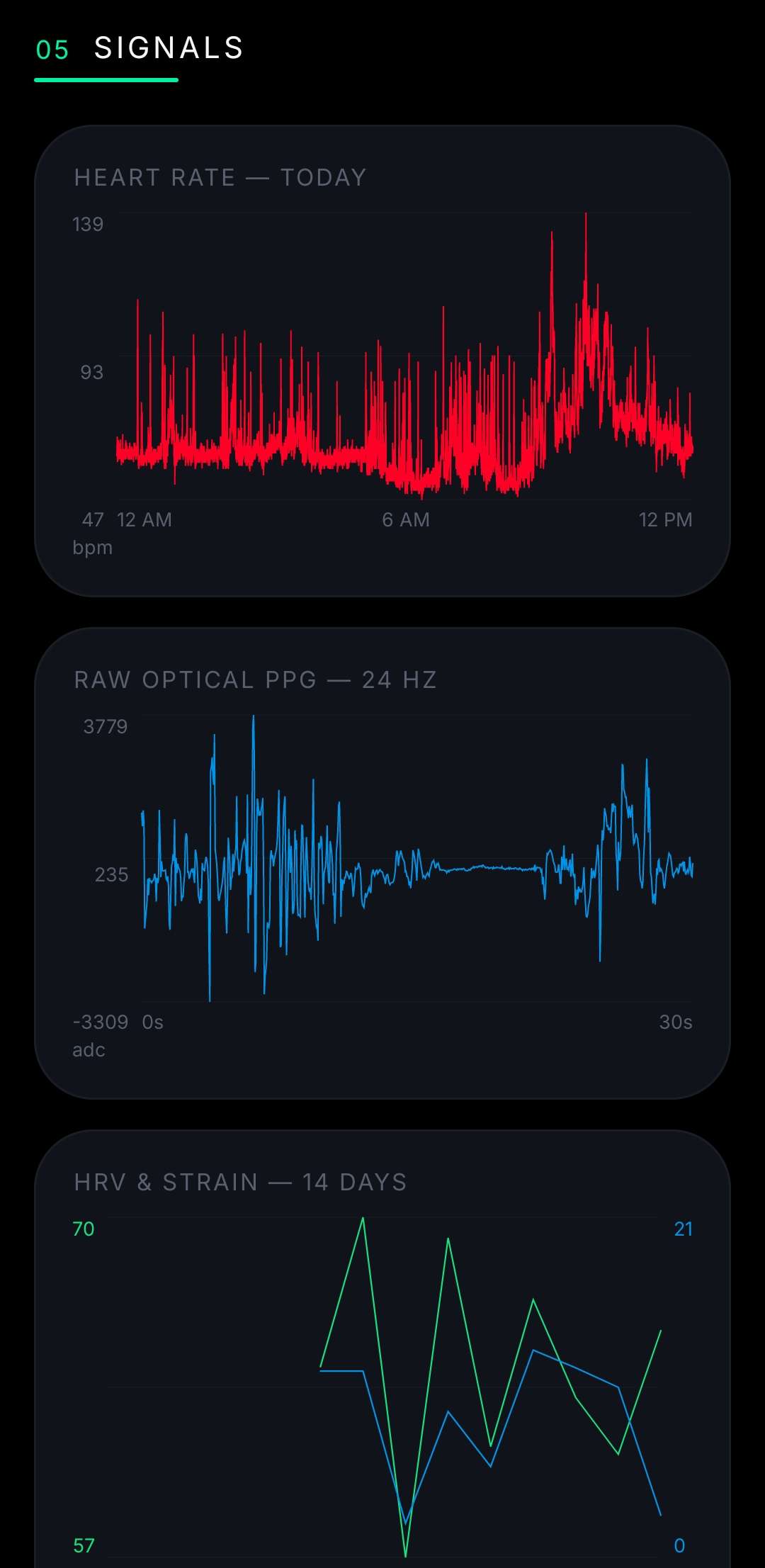
The decoded signals rendered: the all-day heart rate, the raw 24 Hz PPG waveform (the actual pulse, in ADC counts), and the 14-day HRV-versus-strain trend.
Raw HR and R-R intervals are not “recovery.” Turning signals into the metrics people care about is its own discipline, and this is where I want to be the most careful and the most honest: these are published, textbook methods, not WHOOP’s proprietary models. WHOOP’s scores are trained on millions of nights in their cloud. Mine are open formulas run locally. They are directionally useful and, where the inputs are clean, genuinely accurate, but they are approximations, and ZHOOP labels them as such.
Here’s the toolkit.
The gold standard is RMSSD, the root mean square of successive differences between heartbeats, after cleaning out ectopic/artifact beats (the Task Force / Malik method):
fun rmssd(rrMs: List<Int>): Double? {
    val rr = cleanRr(rrMs)            // drop physiologically implausible intervals
    if (rr.size < 2) return null
    var sumSq = 0.0
    for (i in 1 until rr.size) {
        val d = (rr[i] - rr[i - 1]).toDouble()
        sumSq += d * d
    }
    return sqrt(sumSq / (rr.size - 1))
}
Higher RMSSD generally means a more relaxed, recovered nervous system. ZHOOP computes it over the cleanest resting window it can find (an O(n) two-pointer sweep over the night), not just any chunk of data, because HRV measured during activity is meaningless.
Not “your lowest reading” (noise) but the minimum of 5-minute averaged bins, a robust floor:
fun restingHr(hr: List<HrSample>): Int? {
    val bins = HashMap<Long, MutableList<Int>>()
    for (p in hr) bins.getOrPut(p.unix / 300) { mutableListOf() }.add(p.hr)
    return bins.values.map { it.average() }.minOrNull()?.roundToInt()
}
Strain is modeled as Edwards’ TRIMP, time spent in each heart-rate zone, weighted by intensity, compressed onto a 0 to 21 scale (to echo WHOOP’s familiar range):
fun strain(hr: List<HrSample>, rhr: Int, hrmax: Double): Double {
    var trimp = 0.0
    for (i in pts.indices) {
        val pct = ((hr[i].hr - rhr) / (hrmax - rhr) * 100).coerceIn(0.0, 100.0)
        val zone = when { pct >= 90 -> 5; pct >= 80 -> 4; pct >= 70 -> 3
                          pct >= 60 -> 2; pct >= 50 -> 1; else -> 0 }
        trimp += zone * (durationMinutes(i))
    }
    return 21.0 * ln(trimp + 1) / ln(7201.0)   // log-compress to 0..21
}
hrmax comes from the Tanaka formula (208 - 0.7 x age) blended with the observed 99.5th-percentile HR, which is why ZHOOP asks for your age.
A z-score logistic composite: how far today’s HRV and resting HR sit from your personal baseline, run through a sigmoid into a 0 to 100% score with a red/yellow/green band. Critically, it refuses to score until there’s a real baseline:
fun recovery(hrvToday, hrvBase, rhrToday, rhrBase, hrvHist, rhrHist): Recovery {
    if (hrvToday == null || hrvBase == null) return Recovery(null, null)  // honest gate
    val z = weightedZScore(hrvToday, hrvBase, hrvHist,    // HRV term (60% weight)
                           rhrToday, rhrBase, rhrHist)    // RHR term (20% weight)
    val score = (100.0 / (1 + exp(-1.6 * (z + 0.20)))).roundToInt()
    val band = if (score < 34) "red" else if (score >= 67) "green" else "yellow"
    return Recovery(score, band)
}
This is the hardest, and the most honest about its limits. With no EEG, you can’t truly stage sleep, but you can estimate it from motion plus heart rate. ZHOOP detects the main sleep session via sustained gravity-stillness plus low HR, then stages 30-second epochs by a vote of motion / HR / epoch-HRV into Wake / Deep / Light / REM, and computes AASM-style metrics (efficiency, latency, WASO). One real lesson lived in the data: a midnight bathroom trip was splitting one night into two sessions until I taught the detector to merge sleep runs separated by short awakenings, so the interruption counts as wake within the night, not the end of sleep.
EEG-free staging agrees with lab polysomnography only about 65 to 73% of the time epoch-by-epoch (and deep-vs-light is the weakest call). ZHOOP says so, and fades low-confidence nights in the UI rather than pretending.
Also implemented, all from data we already capture:
Every single one is gated: if there isn’t enough clean data, it shows “calibrating” or “n/a”, never a fabricated number. The richer ones (cardio load, biological age) hold back until there are 14 days of wear behind them.
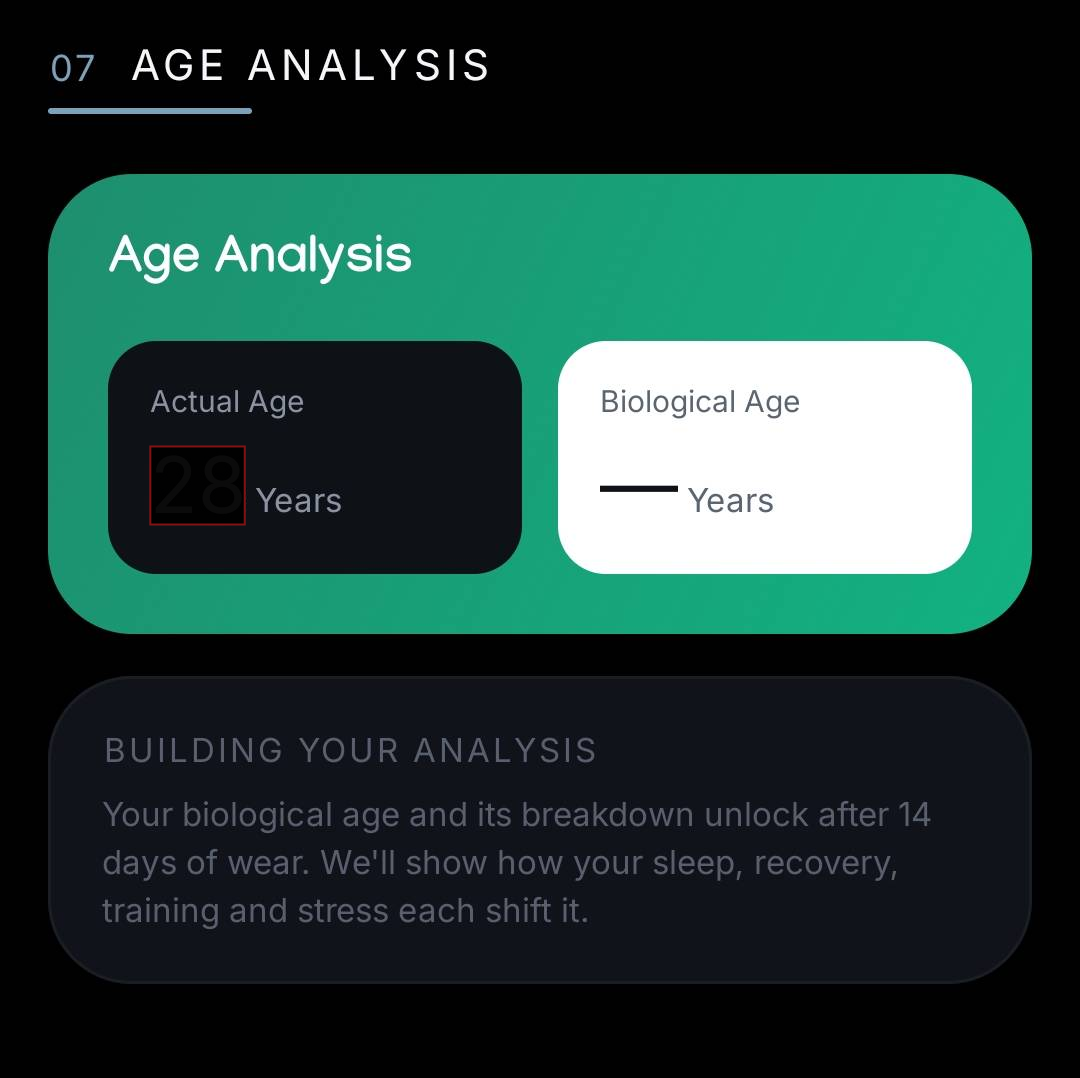
Gating in action: Age Analysis refuses to show a biological age until 14 days of wear are in, rather than guessing.
Numbers on a screen are only half of what makes a wearable app useful. The other half is the things it does: the alarm that wakes you, the workout it notices, the profile that personalizes the math. ZHOOP grew a small set of these, and every one stays inside the same charter from Section 2: my own strap, mostly reading, the only write being a gentle buzz on my own wrist.
This is my favorite feature, because it’s the one place the whole reverse-engineering effort pays off as something you feel. At a time you set, the app wakes up (via Android’s AlarmManager, so it survives the phone sleeping), connects to the strap, runs the handshake, and sends the haptic command from Section 6. The strap vibrates on your wrist.
A few honest details, because the hardware sets the rules:
Getting the rhythm right took real iteration. An early version stacked two buzz triggers and fired nine times instead of the five I wanted; the fix was a single handler that emits a fixed, evenly spaced pattern. Small thing, but it’s the difference between “gentle wake-up” and “panic.”
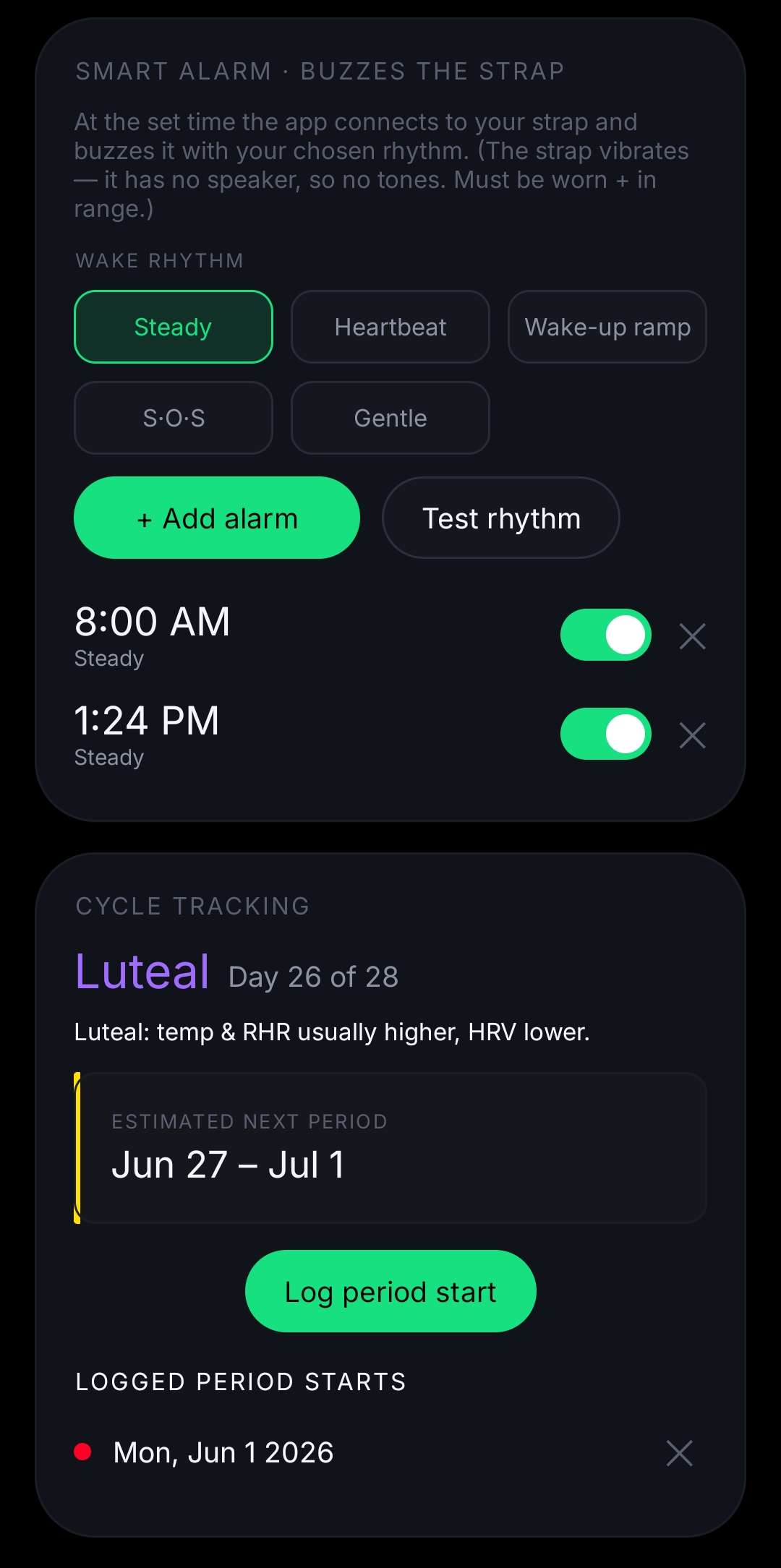
The Smart Alarm with its wake-rhythm chips and a “Test rhythm” button, and the cycle-tracking card beneath it.
The same motion and heart-rate data that feed strain also let the app notice workouts on its own. A sustained stretch of elevated heart rate gets flagged as a detected activity, with its own duration, average and peak HR, and strain contribution. You can relabel a detection (was that a run or a bike?), add a workout the detector missed, or delete a false positive. It mirrors how the web version handled activities, with the detected start time pinned so your edits survive the next sync.
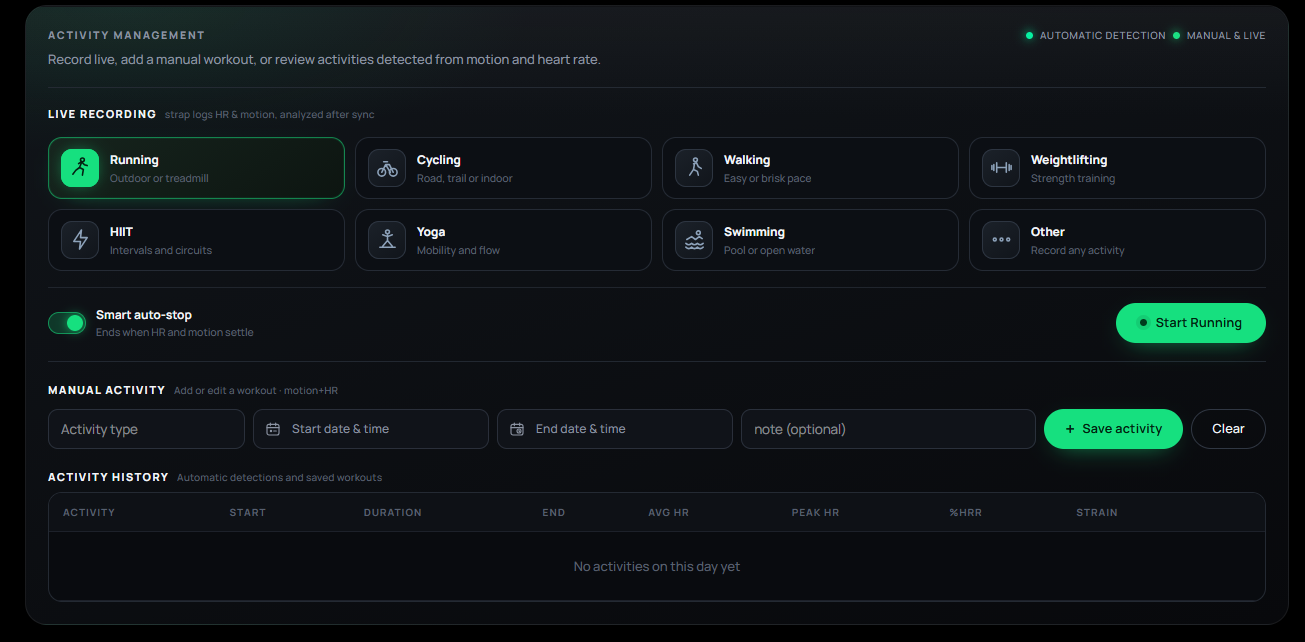
Activity management on the web version: live recording, manual entry, and the auto-detected workout history.
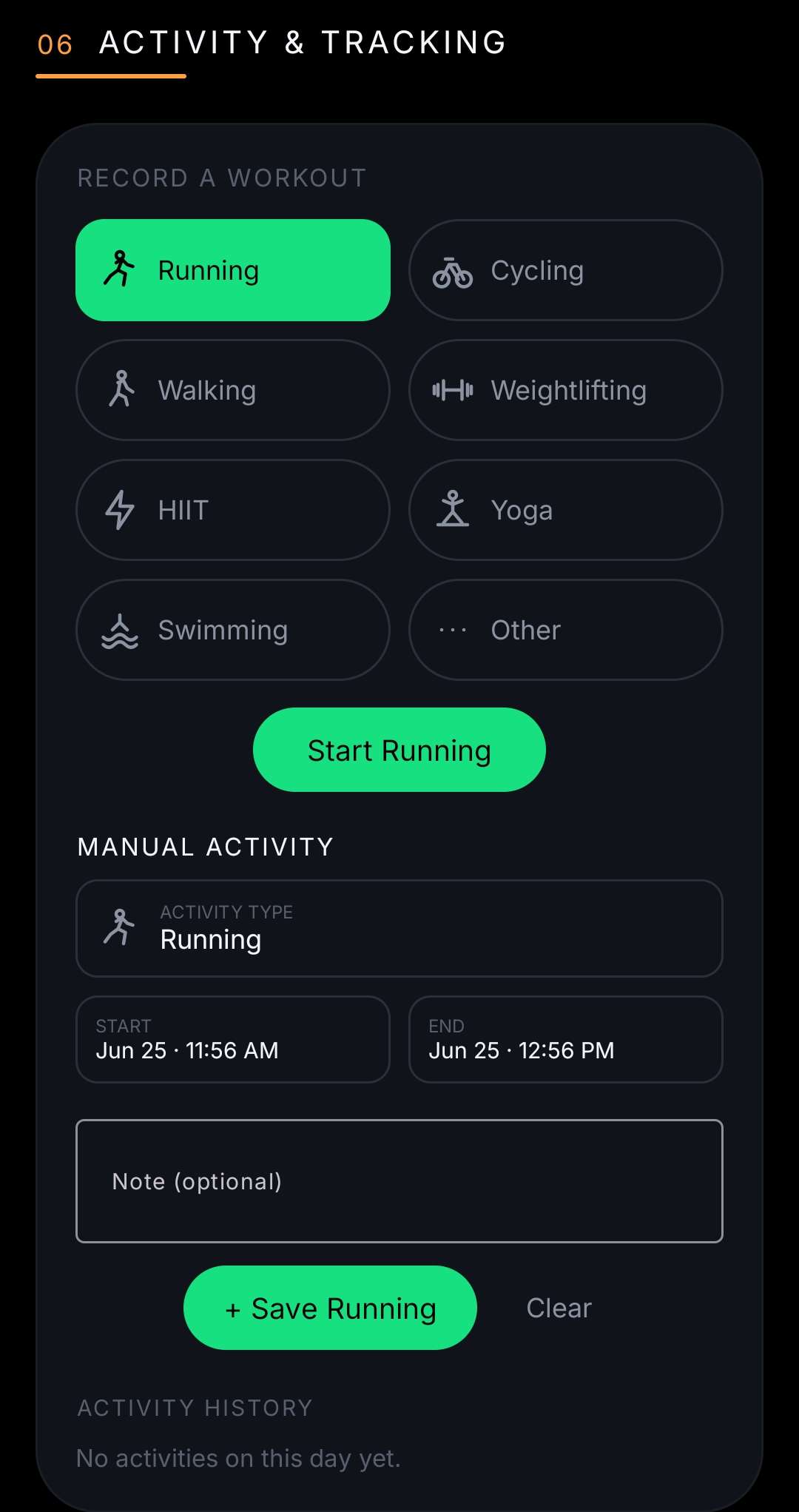
The same on Android: pick a sport, record live, or log a manual workout.
For users who want it, logging a period start lets the app track the current menstrual cycle phase and color it accordingly. It’s a simple calendar-based phase model layered on top of the same daily metrics, useful because recovery and resting HR genuinely shift across the cycle.
Several formulas need to know who you are. Max heart rate (and therefore strain and zones) depends on age; BMR and calories depend on age, sex, height, and weight. So there’s a profile sheet where you enter those, pick an avatar (one of eight cute animated faces in eight colors, the same drawing language as the stress face), and set your display name, the one that greets you as “Good afternoon, Rusheel” in a color that changes with the time of day.
The profile is also where the most important button lives: Delete my data. Everything ZHOOP stores is local, in a database on your own device, and you can wipe it in one tap. No account to close, no server to email, no export request. It’s your data, on your hardware, under your control, which was the whole point.
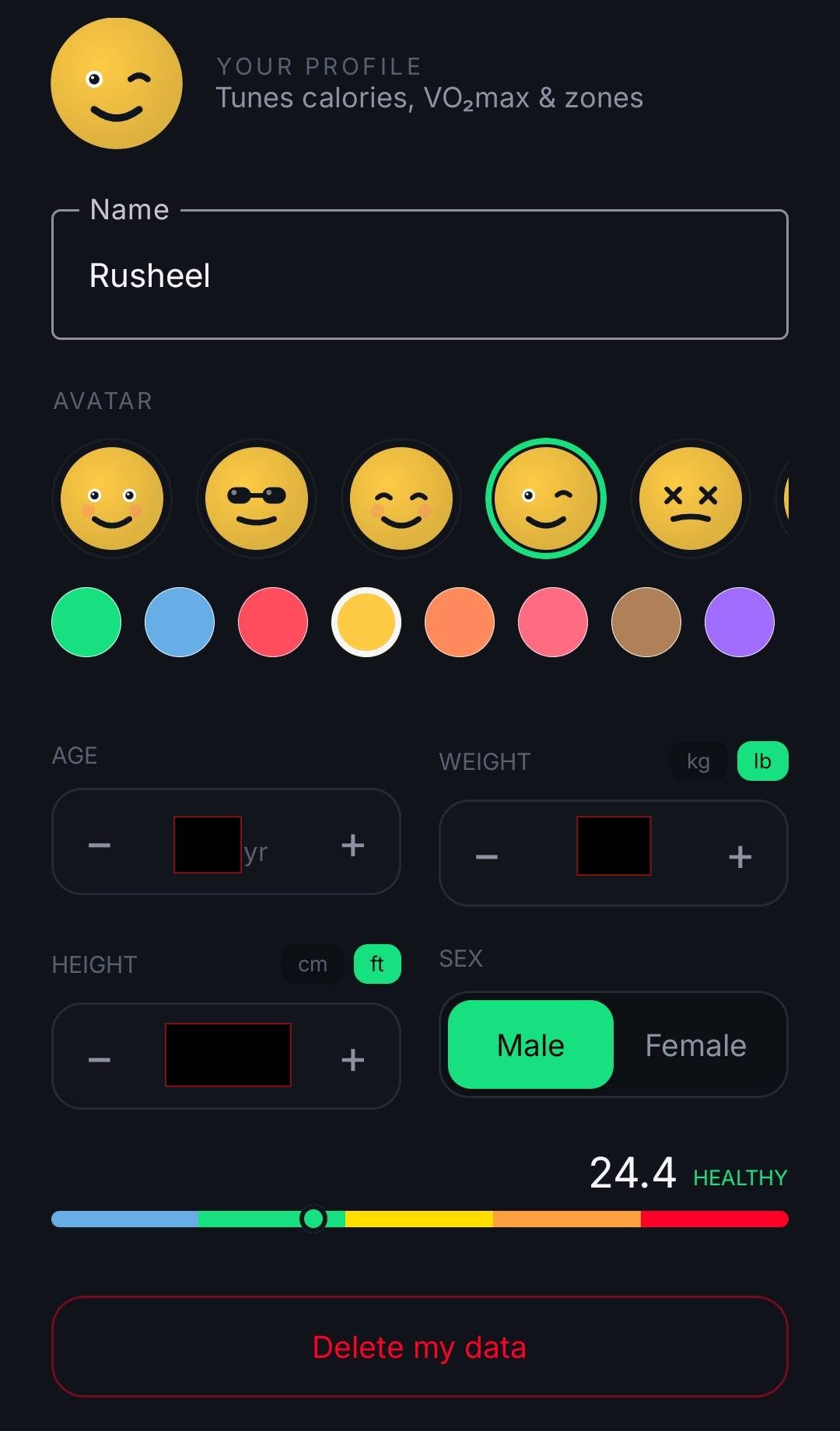
The profile: the inputs that personalize the math, the avatar picker, and the one-tap, local “Delete my data”.
Quietly underneath all of this runs the part that makes the rest possible: a foreground service that holds the BLE link and keeps the history offload current, so when you open the app the numbers are already there. It resumes from a saved cursor, so if Bluetooth drops or the phone reboots, the next sync backfills the gap rather than starting over. (In one test, turning Bluetooth off and on backfilled 404 missed rows with zero gaps.) None of this touches a network; it’s just the phone and the strap, talking.
ZHOOP grew two front-ends.
The first incarnation: a local Flask app (localhost:5000) backed by SQLite. A background auto-sync daemon holds one persistent BLE link and re-requests the history offload back-to-back, so the database stays current. (An early version reconnected every pass and triggered constant “Insufficient Authentication” re-bond churn on Windows; rewriting it to hold the link and handshake once fixed it completely.) The UI is a dark, WHOOP-flavored dashboard: SVG recovery/strain/sleep rings, a stress gauge with a needle, HR and PPG charts with gradient fills, a hypnogram, a 30-day trend chart, and honest gating throughout.
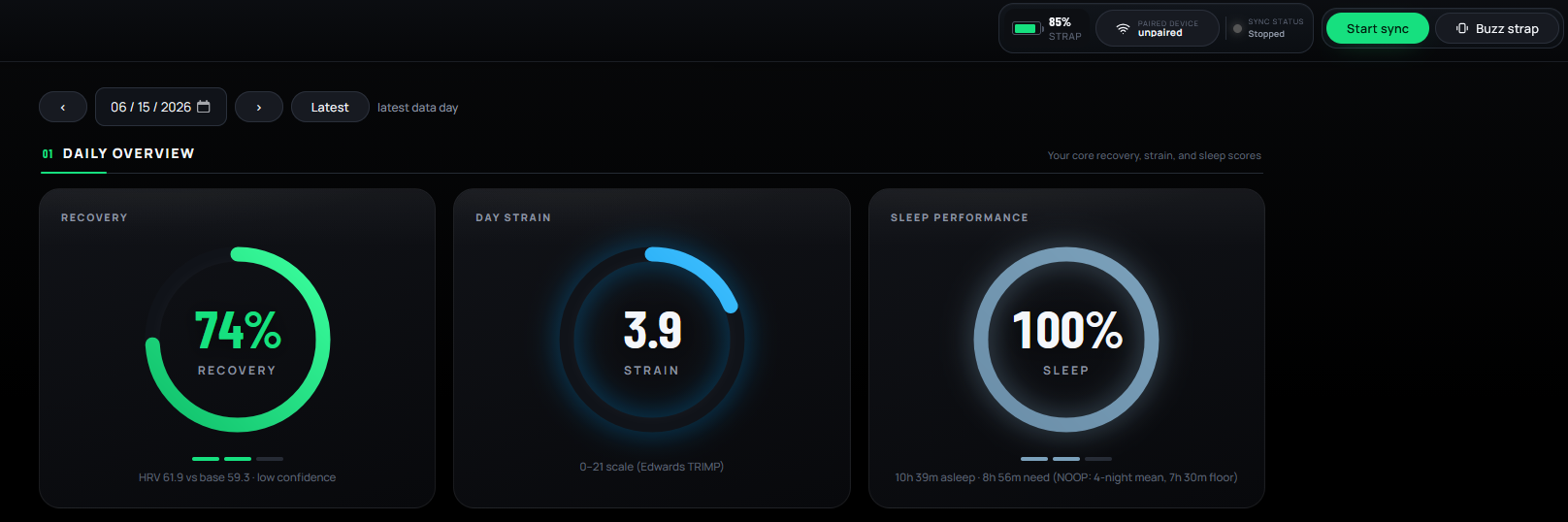
Daily Overview. Recovery, strain (Edwards TRIMP), and sleep performance at a glance.
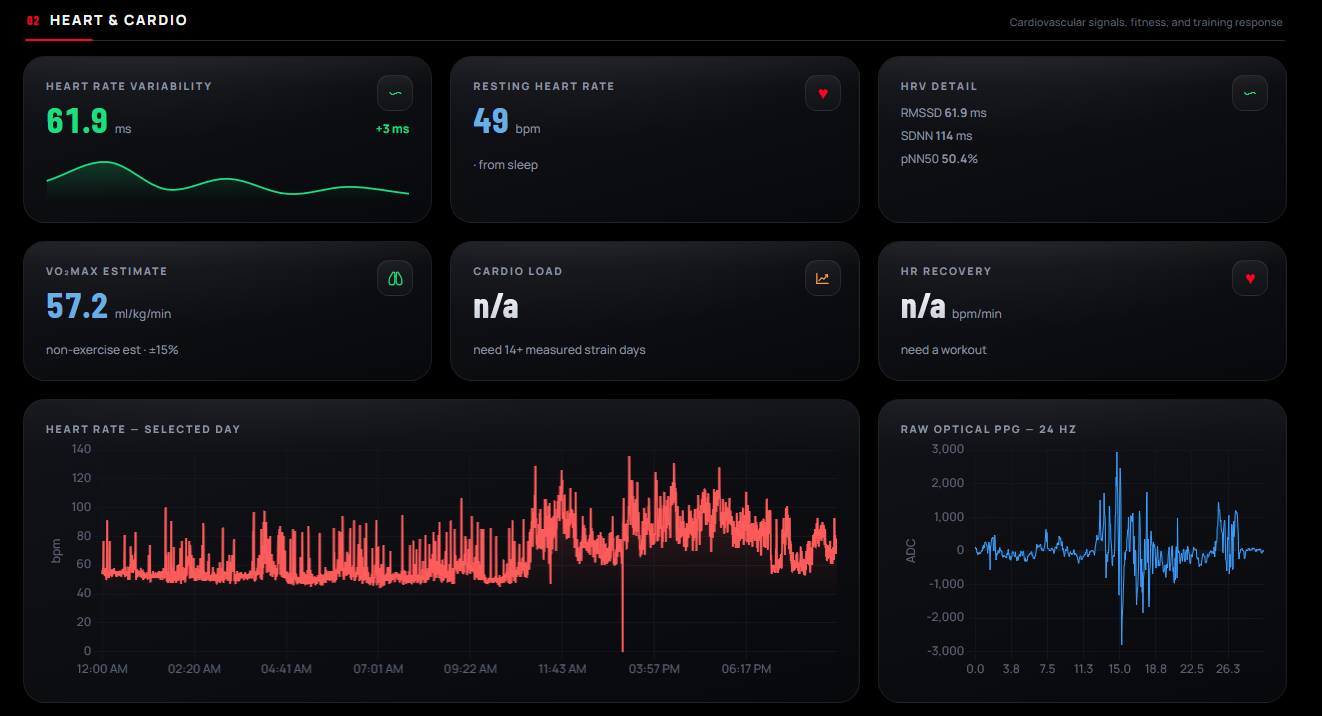
Heart and Cardio. HRV with its RMSSD/SDNN/pNN50 breakdown, plus the all-day HR trace and the raw 24 Hz PPG waveform decoded from the strap.
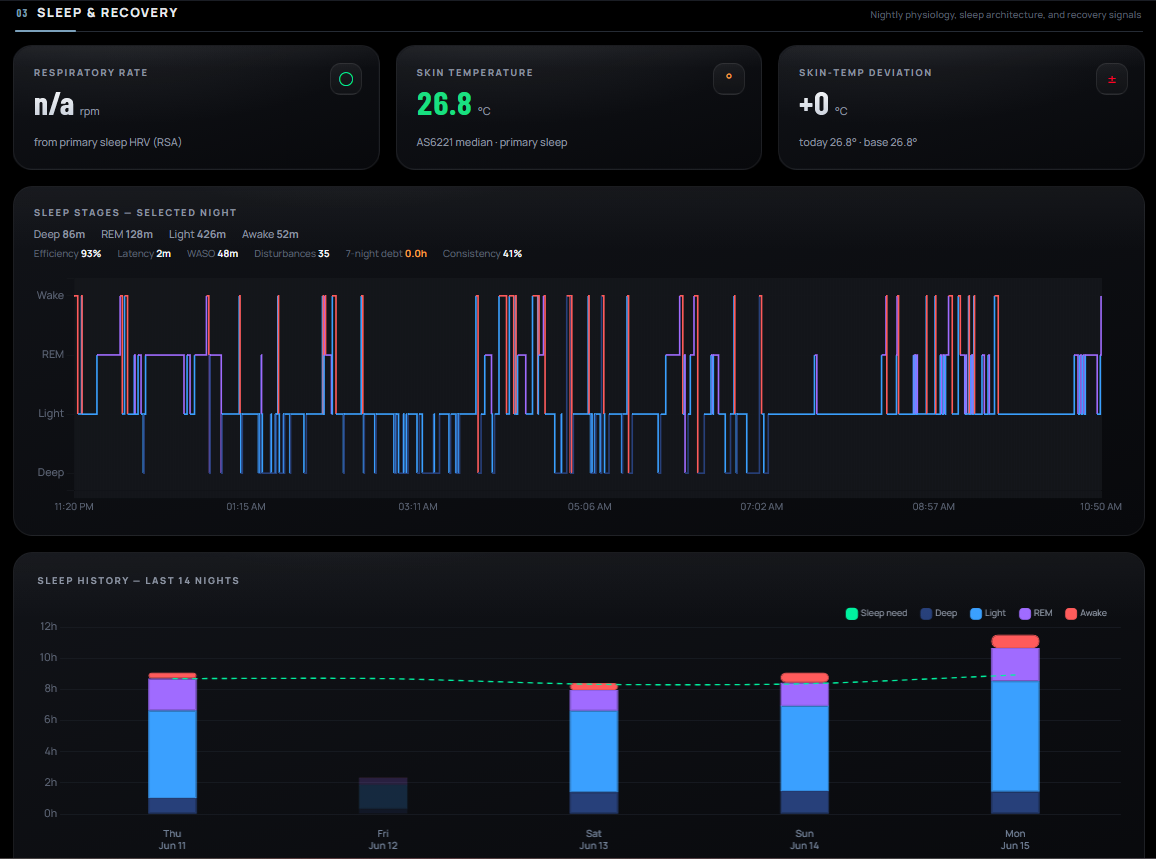
Sleep and Recovery. The hypnogram (Wake/REM/Light/Deep) and a 14-night history with the sleep-need line.
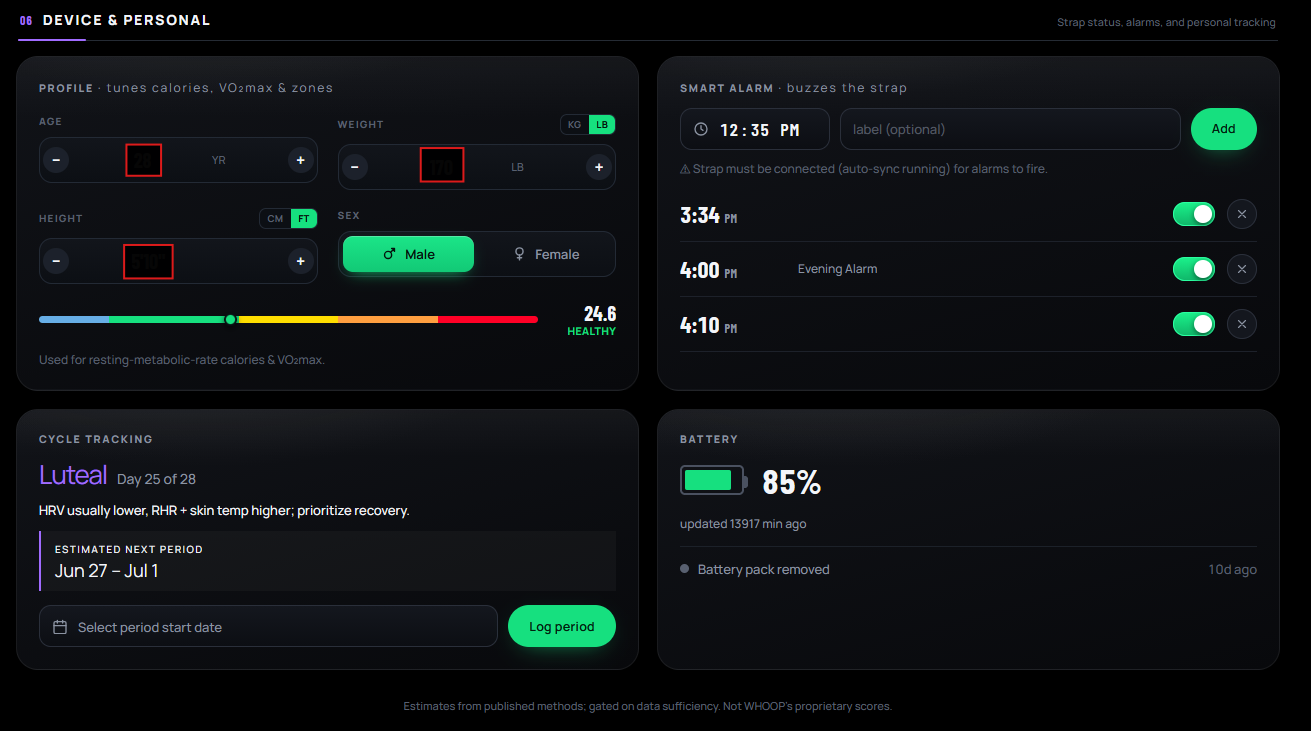
Device and Personal. Profile inputs that tune the math, the Smart Alarm, cycle tracking, and battery.
Then I rebuilt it as a native Android app, so the phone becomes the device that bonds to the strap, no PC required. This is a full Kotlin/Compose rewrite: a foreground service for background sync, a Room database, the entire protocol re-ported and verified byte-for-byte against the Python version, and the same analytics. Doing BLE on Android surfaced its own gremlins worth a war story:
onMtuChanged twice. The duplicate callback, arriving mid-CCCD-write, would cancel the in-flight descriptor write and wedge the GATT queue so notifications never enabled. The fix: settle the MTU exchange before discovering services, and never let a stray re-discovery interrupt the notify-enable sequence.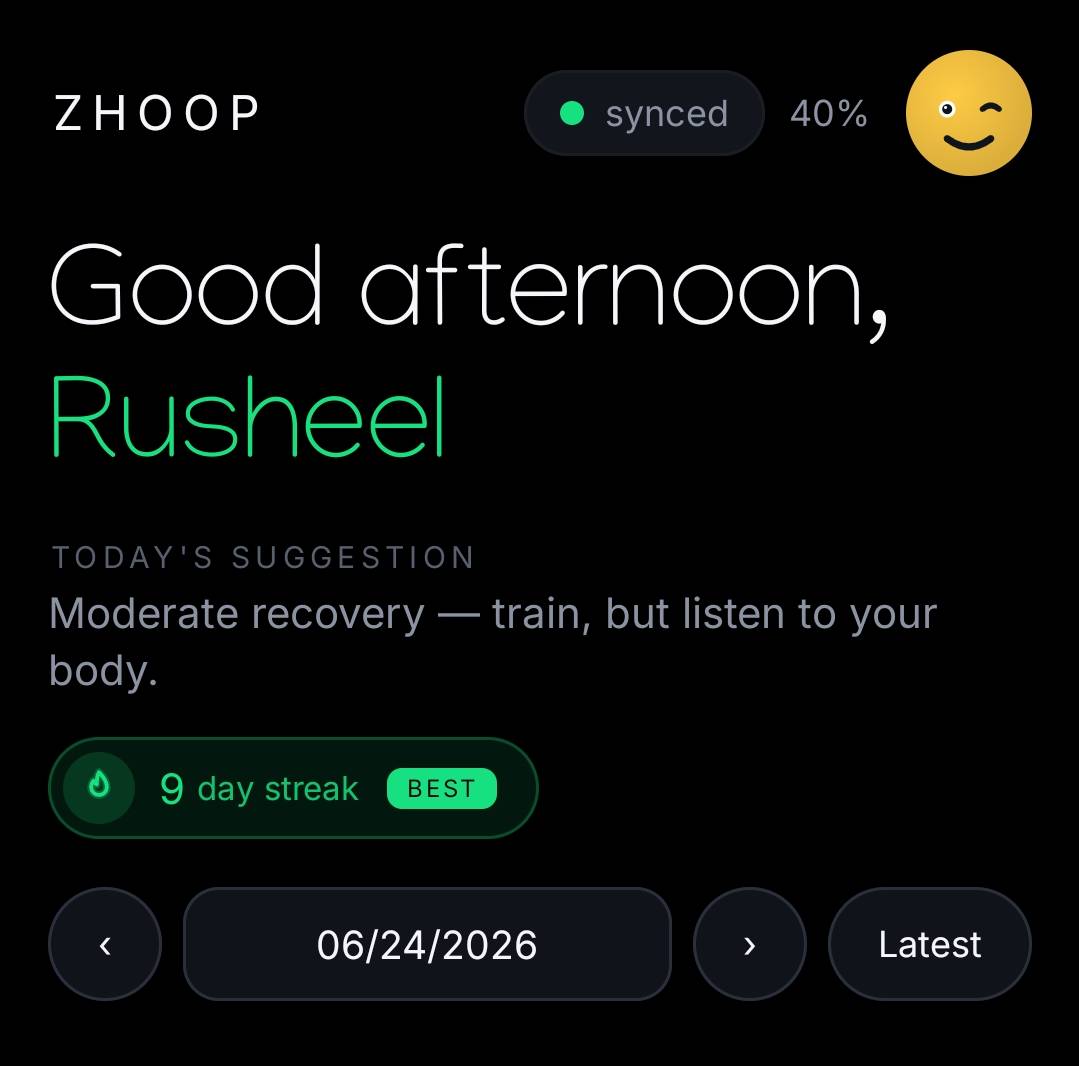
The Android home: a Manjari greeting colored by time of day, the chosen avatar, sync status, and a wear streak.
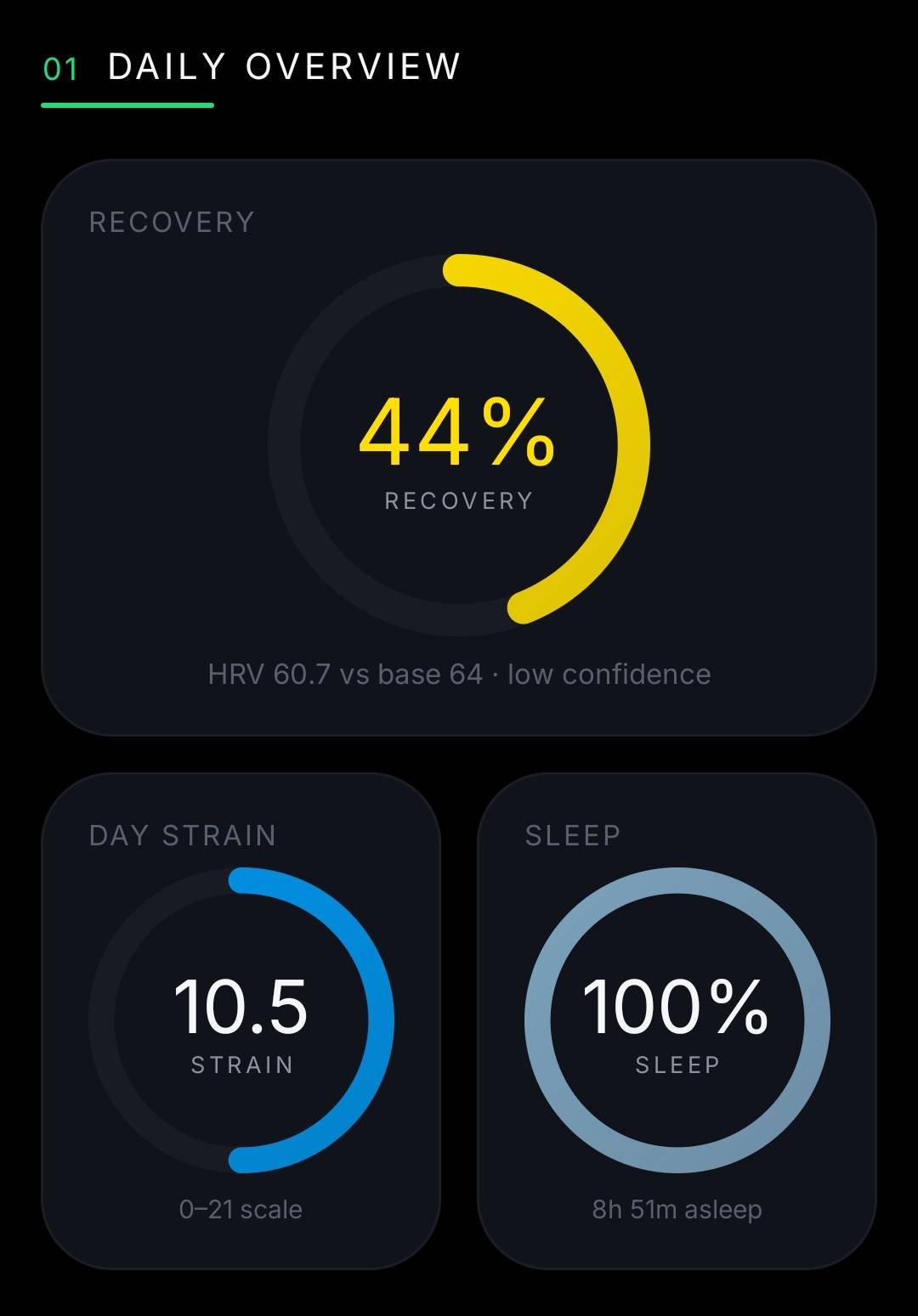
Daily Overview on Android. The same rings as the web version, here on a moderate-recovery day.
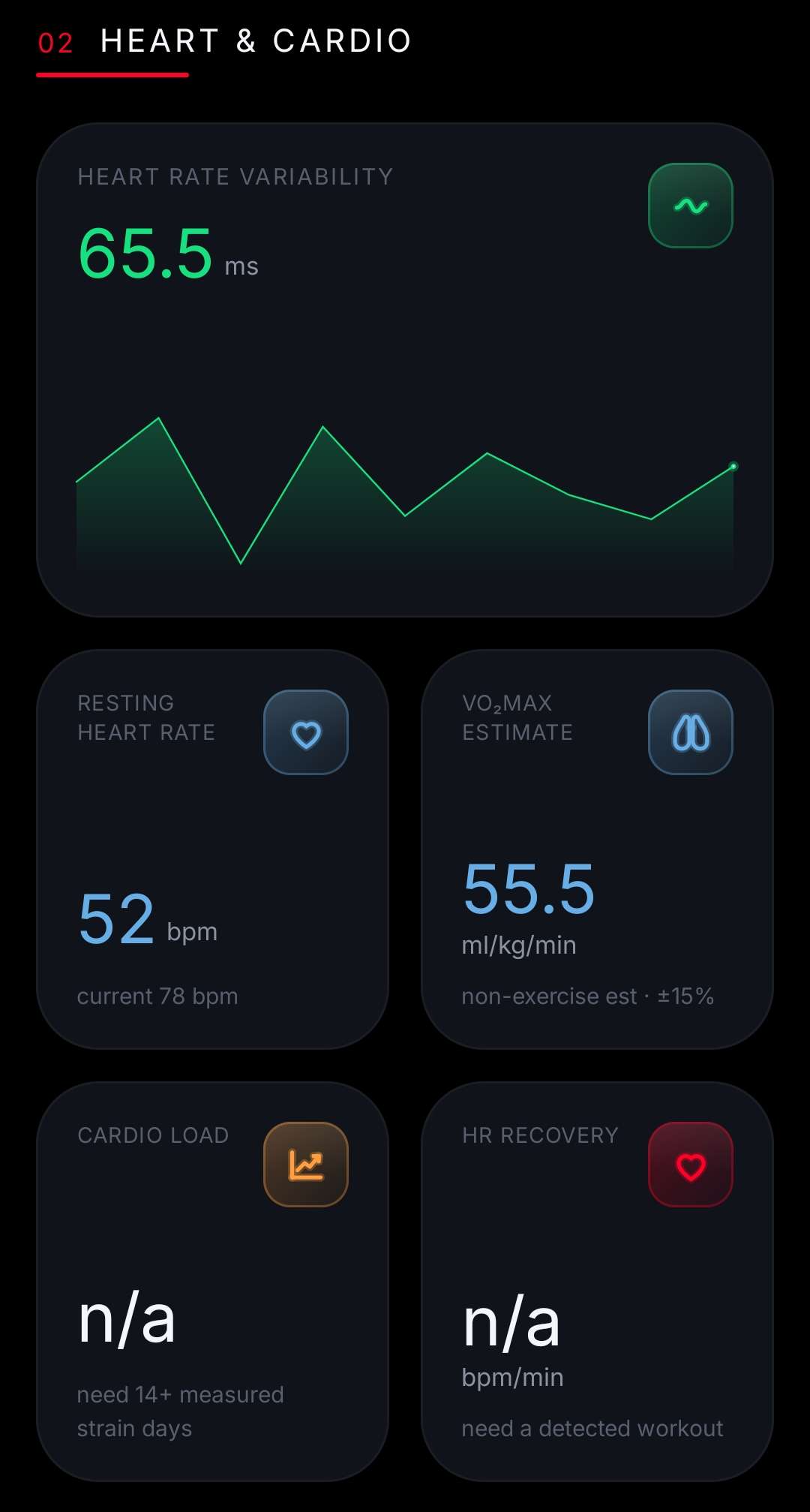
Heart and Cardio. Note the honest gating: Cardio Load and HR Recovery read “n/a” with the reason (“need 14+ measured strain days”, “need a workout”).
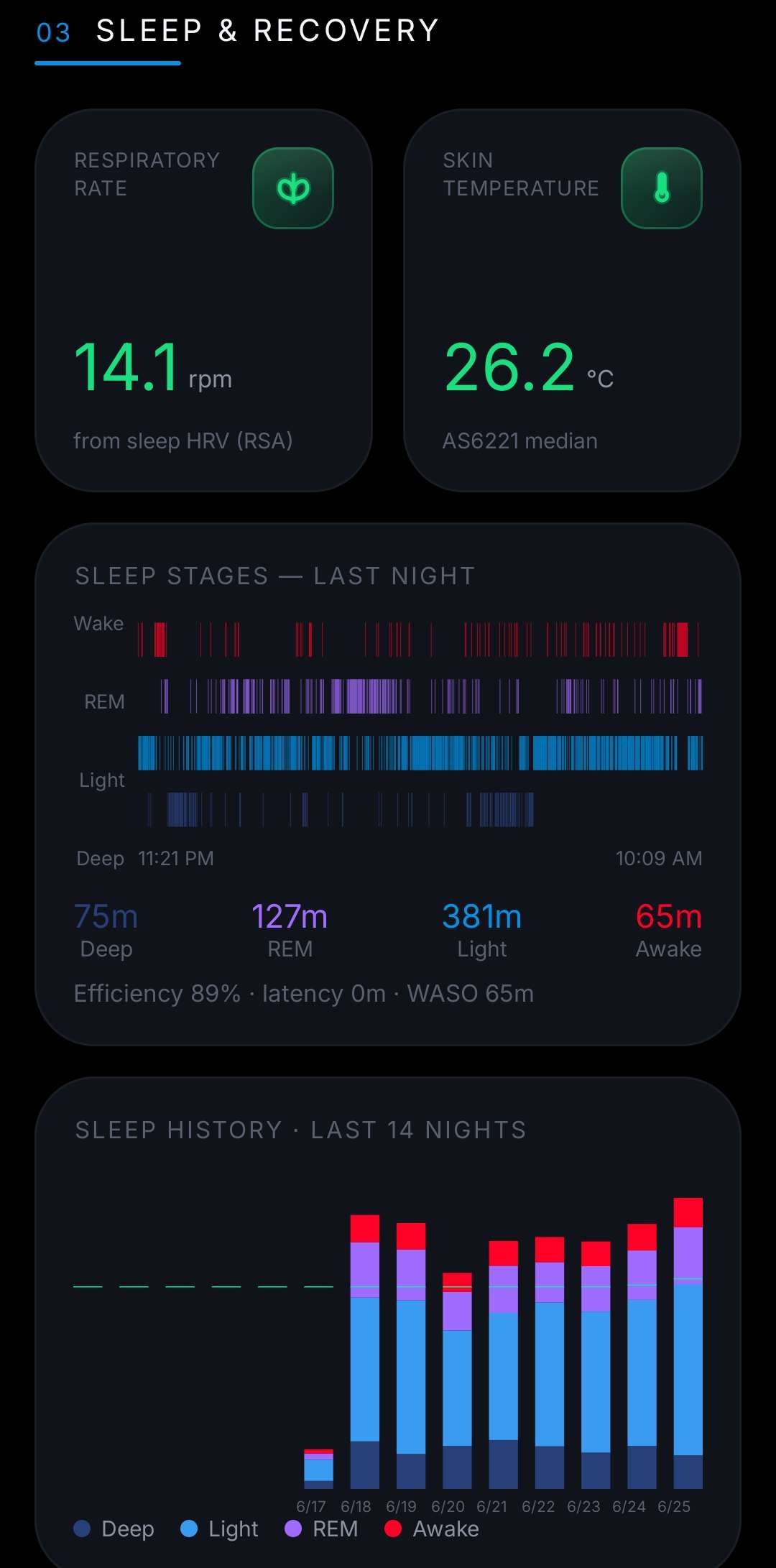
Sleep and Recovery. The hypnogram and a 14-night history that grows as wear data accumulates.
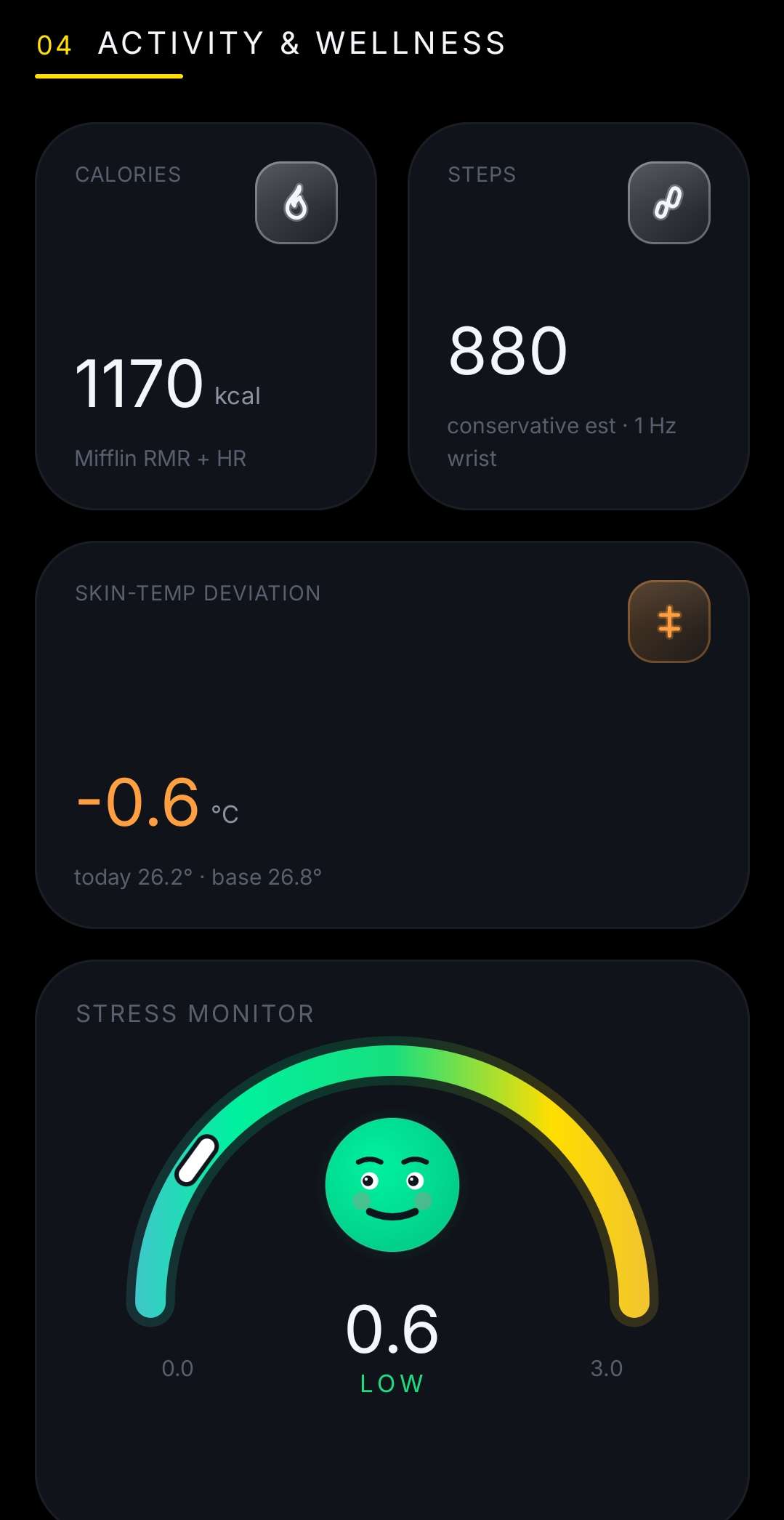
Activity and Wellness, including the Stress Monitor: a 0 to 3 gauge with an expression that reflects the reading.
Both apps render the same truth, because both consume the same decoded fields. The screenshots in this post show both: the Flask web version and the native Android one, both displaying my data, pulled locally.
This section matters as much as any decode. A reverse-engineering writeup that only lists wins is a sales pitch, not an education. Here’s where ZHOOP hits hard walls, and admits it:
/128 scaling gives a clean trend but the absolute calibration isn’t verified.And the honest framing of accuracy, in tiers:
The two hard truths, stated plainly to anyone who asks: (1) ZHOOP doesn’t have WHOOP’s proprietary algorithms, and (2) good metrics need weeks of continuous wear; no formula can conjure a real recovery score from three sparse days. The app behaves accordingly: it gates, it labels, it refuses to lie.
I started with an itch: what is this thing on my wrist actually saying?
A few weeks later, I can answer in detail. It speaks in 0xAA-framed packets guarded by three checksums. It holds one bond, wakes to a static hello, and tells its fourteen-day story in an acknowledged conversation. It encodes my heartbeat at byte 22, the gaps between beats from byte 24, the pull of gravity as three little floats, and the light through my blood as 24 samples at a time. And from those bytes, with textbook math, you can rebuild a meaningful picture of a human body, honestly, if you’re willing to admit what you don’t know.
What stays with me isn’t the data. It’s the demystification. A WHOOP strap stops being a magic oracle and becomes what it always was: a small, elegant computer running careful signal processing, talking a language you can learn. There’s a particular joy in that, the same joy as understanding how an engine works, or why the sky is blue. The device you own becomes a device you understand.
ZHOOP isn’t a product. It’s a love letter to curiosity, written in hex. I kept it on my own wrist, on my own desk, off the network, away from the cliffs. And I learned more about heart-rate variability, optical sensing, BLE, and embedded protocols in three weeks than in years of just reading the numbers an app gave me.
If there’s a moral, it’s this: the things we own are more knowable than we assume, and knowing them is its own reward. Pick something on your desk. Ask what it’s really saying. You might be surprised how willing it is to answer.
ZHOOP was built and run entirely on hardware I own, over a local Bluetooth link, for my own understanding. WHOOP’s Recovery, Strain, Sleep, and related scores are proprietary; the metrics described here are independent, open-method approximations and are not affiliated with or endorsed by WHOOP, Inc. Nothing here circumvents WHOOP’s cloud service or DRM, and the applications described are not distributed. If you try anything similar, do it only on your own device, and never send the destructive commands.